Innovate not imitate!

Innovate not imitate!
Interested in the latest Growth hacks?

Welcome to our blog

Interested in the latest Growth hacks?

Welcome to our blog!

We want to help you start/manage and grow your business using innovative strategies and implementation. We have a passion for helping businesses and companies of various sizes see the same success that we have achieved.

Our skillsets are wide and varied, from business strategy, marketing, to online strategy. An increasing number of companies are turning to the internet and online media as a means to maximising their marketing reach and exposure. This is special area of focus for us and we do more than simple SEO strategies.

See our website for more: www.innovatetoaccelerate.com

Thursday, 11 July 2019

Why an SEO should lead your website migration

Change is a natural part of a business, particularly when it comes to your digital presence.

The need to rebrand, switch up the CMS (content management system), consolidate your resources or revamp the architecture and user journey of your website, is ultimately inevitable. And whatever the goal may be, it is not uncommon for all major initiatives to fall under the umbrella of a contemporary digital marketer.

How does Google feel about changes

One thing to keep in mind, however, is Google’s tendency to be less than accommodating towards major website changes, especially URL changes. And who can blame them? Whilst Google’s algorithm may be able to detect semantic differences between websites, it’s somewhat unrealistic to expect it to also realize that the similarities between store.hmv.com and hmv.com mean they’re both the same brand.

Therefore, without acknowledging this, many domain changes result in staggering losses of traffic and rankings, and suddenly the most well-known brand in an industry becomes non-existent within Google’s universe. It is therefore imperative to ensure the changes you’re making can be correctly comprehended by Google.

How to understand Google

Expecting a lonesome digital marketer to be a jack of all channels is quite unrealistic. But luckily you don’t need to be. There’s a whole industry of people who are dedicating their days to figuring out how to think exactly like Google, and they can help you avoid the risk of decimating your hard-earned keyword rankings (unless you’re doing black hat tactics, in which case, those rankings aren’t very hard-earned after all). This industry is SEO.

Three pillars of SEO

Before we dive into the value SEO, here’s a quick summary of the three key pillars:

  • Accessibility: Technical workings of the site. This includes everything that Googlebot takes into account when understanding your site’s code. Basically, all the tags and developer language that are telling the crawlers how the site should be interpreted.
  • Relevance: Content your visitors and Googlebot came for, including all of the text and metadata on your pages, blog posts, and even videos – everything your visitors see.
  • Authority: Backlinks from other sites, with each one counting as a “vote” of confidence, which Google takes into account when ranking.
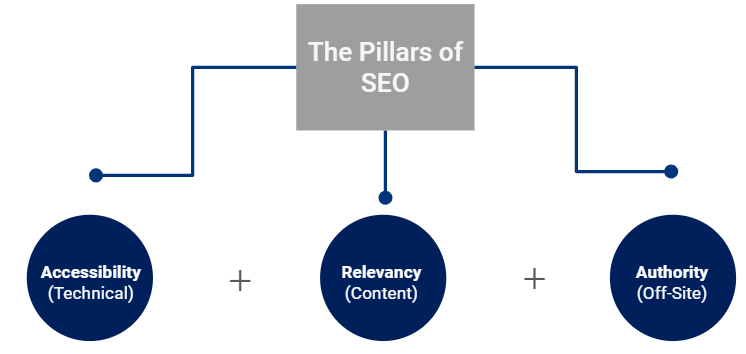
chart on the three pillars of SEO

So with that crash course, we can now connect the dots between SEO expertise and high-level migration requirements.

Why you need SEO

Whilst a website’s appearance is important, first and foremost it’s crucial to understand how you’re going to explain the changes you’re making to Google. We suggest a handwritten note:

“Dear Google,

Don’t worry, some things are changing but we still love you, so here is a comprehensive, incredibly large map of URL redirects detailing the new versions of the exact same pages you know and ranked the first time around.”

On a more serious note, however, here are five ways in which the expertise of an SEO professional can propel your website towards successful migration.

1. Taking the complexity out of URL mapping and redirects

Since a site’s internal linking and page equity is an essential part of SEO, we deal with redirect handling and URL mapping and all the complications that come along with it, all the time. Therefore, you have to make sure each redirect makes sense, and also that each page is able to take on the new status. Common issues at this stage can include:

  • Incorrectly implemented redirects (302 or the dreaded 307) that may undermine your intentions
  • Extremely long or even infinite redirect loops, which will cause Google to rage-quit the page or even your entire site
  • Redirects to irrelevant pages, which Google may not mind too much but will annoy your users

Just in case you’re not convinced, here’s a scary graph of what happens when you don’t do this properly.
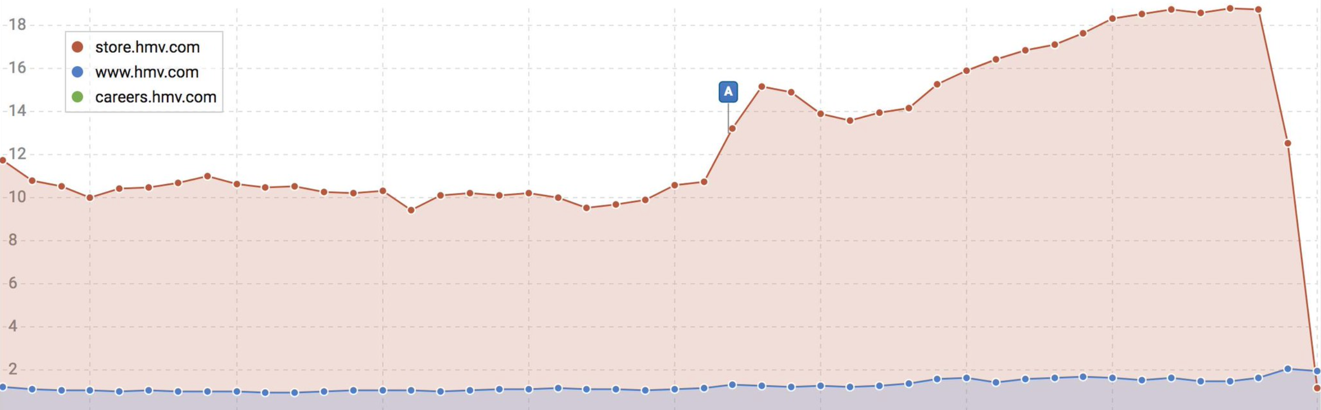
graph showing repercussions of bad URL mapping

Source: Croud

The process of telling Google what’s what extends beyond redirect mapping, it also includes on-page work. Specifically, the canonical tag.

Fun fact: 301 redirects don’t actually stop Google from indexing your pages, so if you left it at that, you would just end up with some poor rankings and some confused users. Luckily, your friendly neighborhood SEO knows all about the various ways to help encourage Google to drop your old page out of the index as it goes along your new site.

2. Understanding your website’s behavior

So, you’ve done all the mapping and have set up just how to introduce Google to your new site. While that’s very exciting, we do have to remember the “understanding” part of these first several weeks. The primary reason for site migration is to provide a new and improved site that will (hopefully) gain more traffic and drive more business. However, without understanding how your original site performed, it’s very difficult to establish if your new site is actually superior. This, therefore, highlights the importance of benchmarking.

Of course, you may know how much traffic your ad campaigns – and even your website in general – are pulling in, but you’ll need to know more than that to be successful. As SEOs, our aim is to understand your site as much as the search engines do, which as explained above, is much more than just content on your pages.

To paint the best picture of your website before you migrate, use several tools that provide a variety of key SEO data points:

  • Keyword rankings and their respective landing pages
  • Links to your site
  • Pages with 200 (and non-200) status codes
  • Crawl volume and frequency

By aggregating the different metrics and views of each tool, you can create a beautiful, detailed portrait of how your website behaves, and how it’s interpreted by both search engines and users. Astute benchmarking will allow for in-depth, helpful post-migration analysis, particularly for those metrics that can only be recorded at a particular moment. There’s no way to tell how fast your pages loaded, or how many pages returned non-200 status codes last week. If you don’t gather this information beforehand, you won’t be able to fully report the impact of the migration.

After you complete the migration, you can gather this data again to truly judge your results. Everyone will remember to check the new traffic statistics, and even the new rankings, but only an SEO will remember to check that those numbers make sense and you haven’t accidentally orphaned half of your product pages. SEOs will make sure users aren’t just on your site, but crawlers are too. With proper data at your disposal, you can set about making iterative improvements which will undoubtedly be necessary.

3. Migrating your tracking tools

All this talk about performance and results is for naught if you can’t actually track any of it. Much like Google’s search engine, Google tools aren’t so keen on supporting your site migration either. Therefore, you have to make sure you’re ready to start tracking the new site, ideally without losing your old data.

Dealing with various tracking tools and codes all the time, an SEO has to be a Google Analytics expert too (it’s commonly a requirement on most resumes). So how do you avoid a scenario in which either you have no historical data and can’t measure the success, or when you have two different accounts and have to do the calculations for performance comparisons by yourself? By making plans to migrate your tracking tools.

Ideally, you’ll use the same analytics tracking code for the migrating site, so that the old metrics can be directly compared to the new numbers once it takes place. Need some more persuasion?

Take a look at this graph detailing a successful site migration.
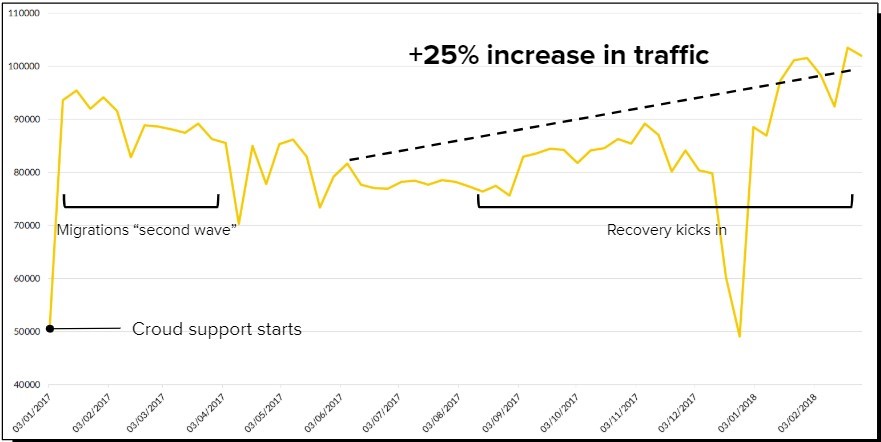
graph detailing a successful site migration

Source: Croud

 4. Testing and the importance of the human touch

So you’ve planned all your new pages, and your new site is built. What’s next? Hopefully, it’s built in a staging environment and not actually live. If it’s not, you run the risk of causing all sorts of issues with duplicate content and ranking cannibalization.

However, your SEO can easily take charge of this with a robots.txt directive (which will haunt them until the site is live and they can change it). Despite its purpose, a staging environment doesn’t always reflect the search engine’s behavior since it lives in isolation. There’s no way to track backlinks or see exactly what it will look like in a SERP at this time.

Often, Googlebot doesn’t even fully crawl staging environments, because it’s seen as time-wasting. Therefore, your SEO’s brain is your very best test.

Everyone will check that the pages are set up as planned, but your SEO will be the one who can thoroughly re-test each individual redirect at 2 am. This will likely be the last time that any mistakes will be recognized before launch, so it’s critical to make sure that every redirect behaves as expected and that they are all 301 status codes.

Lastly, you’ll need to make sure that a single XML file stays live on the legacy site, containing all the legacy URLs. This will be used to push Googlebot through the old URLs and onto the new site, expediting your meticulously-mapped redirects.

5. Launching and mitigating loss

Finally, you’re ready to flip the switch and the champagne bottles are out. So you turn on the new site, and congratulations – you’ve just lost 20% of your traffic.

No, really, congratulations. In case you forgot the daunting chart we shared earlier in this post, website migrations can cause damaging losses, and sites that don’t prepare accordingly, often never recover. However, if you’re smart and you hired an SEO expert to take charge of this project, they’ll have the task at hand.

Your traffic loss is a product of search engines and users not recognizing your new site – temporarily. Your SEO will have made sure everything is set up properly, so Googlebot is quickly figuring out that your new site contains all the same high-ranking, trustworthy content as on your old site. It’s still a little miffed at you for changing on it, so you may only get back on the second pages of results.

You’ll still have some further optimizations to do, but it’s much easier to go from page two to page one, rather than page ten to page one.

Just remember, we’re guiding this migration from an SEO perspective. Googlebot is basically a person, so as long as it can read the site, we assume that users will enjoy their experience too.

Kailin Ambwani is a Digital Associate at global digital agency Croud, based in their New York office.

The post Why an SEO should lead your website migration appeared first on Search Engine Watch.


from SEO – Search Engine Watch https://ift.tt/2S9P3N6
via IFTTT

Wednesday, 10 July 2019

Search engine results: The ten year evolution

The search landscape has always been one that is evolving. Right now the big discussion is around Google’s control on how much search traffic goes to publishers vs. stays on Google.com.

This might end up being a really big point for Google when it comes down to challenging the long-held point of view that competition is just one click away.

Over the past ten years that I’ve been writing for this publication, I’ve written an article each year where I review how paid and organic search can work together, and how brands appear in search listings. This article over the past few years has started to evolve into how Google has changed the search page. These changes include the inclusion of more paid search results, shopping, and local listings. As you will see from the data there is certainly a trend that is fueled by both Google’s growth objectives as a publicly-traded company, as well as consumer behavior shifts (that are, mobile and local).

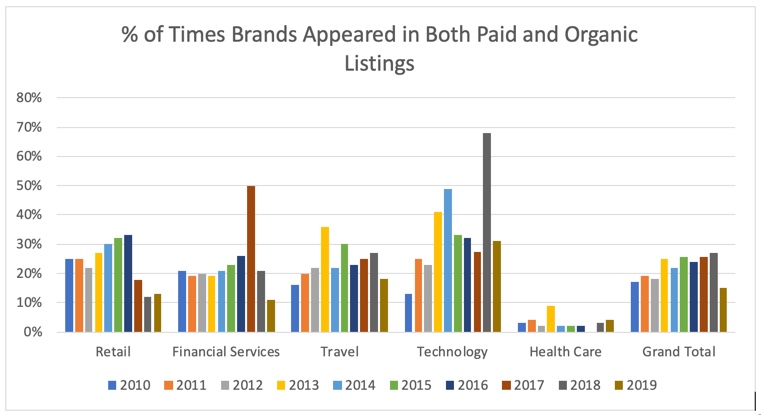
The first piece is the overlap of paid and organic listings. What I’m tracking here is the number of times a brand appears in both paid and organic search results as a percentage of total paid results. For example, if there are three paid search ads, and GEICO, Progressive and Liberty Mutual all appear in both the paid and organic listings that would score 100%. I’ve been tracking five verticals since 2010. What’s really interesting is over the past few years the amount of overlap has gone up on average. However, this year the overlap dropped by 44% year over year. This had a lot to do with the drops across financial services, travel, and technology.

industry-wise paid and organic listings

Source: Google Search Data

Factors driving this change

I think this trend is driven by two factors:

  1. Increasing competition & costs – CPCs (cost per clicks) were up by five percent between Q4 2018 and Q1 2019
  2.  Rise of other areas of optimization – Local Listings/Maps/Google My Business and Shopping. These additional areas have provided both a distraction and a release valve for additional traffic, and higher ROI.

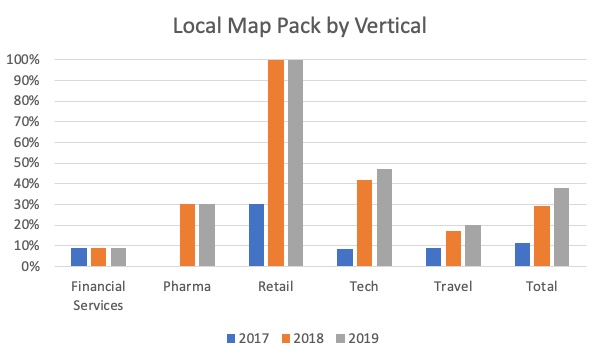
graph showing the sources driving change YoY

Source: Google Search Data

So what has been happening to the other areas of optimization, especially local and shopping? I have also been tracking these areas over the last three years. The change is exactly what you would have expected. Over the past three years, the percent of search terms that have local listings has increased more than three times, from 11% in 2017 to 38% in 2019. Retail continues to have 100% of listings with the map pack. This validates the importance to both Google, brands, and consumers of having a local presence. Also gives additional credence to optimizing and cleansing your location data, not just on Google, but across the web.

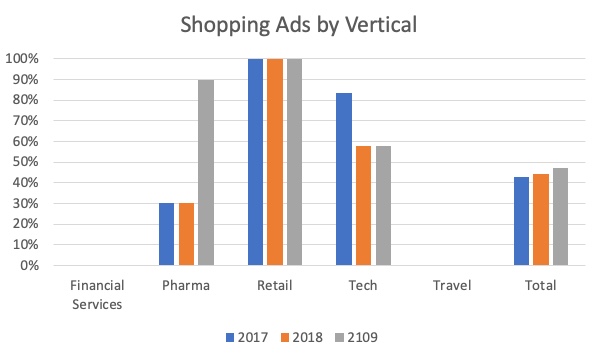
graph showing industry-wise growth of shopping ads YoY

Source: Google Search Data

Shopping ads have come on in a big way

Shopping ads have also continued to have a strong presence and have grown slightly. They are up from 43% in 2017 to 47% in 2019. Shopping ads provide a more visual experience for the consumer, and some very strong conversion rates for brands. Google has also been continuing to evolve their shopping product announcing a redesigned shopping experience in May. This included new ad formats, online to in-store options, and Smart Campaigns (which help encourage SMBs to get into the game). All these changes and enhancements demonstrate a commitment to the product and the value to both consumers and brands.

What should you be doing as a search marketer?

So what is the impact of this data to us as search marketers? I think there are two key takeaways:

  1. Search is more than just keyword listings and optimizing your website. Yes, SEO and paid search are critical, but extending beyond that is also very important. Optimizing your product feed, and local listings are very important to success. You must think about how you are there for your consumers regardless of what they are trying to do, buy, visit, or call.
  2. Having a winning strategy for critical search terms is important. You might not be able to afford top placement for paid search, or technical issues might be preventing you from having the top organic listing. However, that doesn’t mean you don’t need to have a presence for those terms over the long term. These could be choosing specific times of the day, or including schema markup for event listings. Whatever the case may be, there are now more ways than ever to be found, and having a very thoughtful strategy for your brand is key.

The search engine results page will continue to evolve as consumer behavior and technology evolves. Think about the continued expectations of online to offline buying behavior, real-time inventory, or the impact 5G will have on the marketplace. Remind yourself to take a look around at a macro-level to see the trends vs. always focusing on detailed keyword level optimizations. You will often find some great trends to help put your strategy in context.

P.S. Special thanks to Audrey Goodrick who helped pull together this data. Thank you for your help this summer Audrey.

The post Search engine results: The ten year evolution appeared first on Search Engine Watch.


from SEO – Search Engine Watch https://ift.tt/30AG62v
via IFTTT

Monday, 8 July 2019

Six HTTP status codes most critical to your SEO success

HTTP is the standard protocol defining how information passes between your visitor’s browser and the server hosting your site and HTTP status codes are your handy way of knowing exactly what is happening within that process.

For web marketers, it’s well worth the effort to get familiar with these status codes. By understanding your site’s backend activity you can recognize errors that demand attention and find opportunities to help improve (or at least not hinder) your SEO efforts.

A quick HTTP status code overview

HTTP status codes are three-digit numbers. The first number indicates which of the five categories each belongs to. The categories refer to either a type of request or type of error, as follows:

1xx status codes: Information request

Status codes beginning with a “1” communicate that a server is processing information, but has not yet completed the request.

2xx status codes: Success 

These status codes indicate that a requested information transfer was successfully completed. For marketers seeking to improve SEO, these codes mean that no action is required, everything is working correctly.

3xx status codes: Redirection

These redirect codes communicate that your visitor requested information that was not available at the targeted address.

4xx status codes: Client error

These codes signal that the client (the browser accessing the site) has encountered an error when trying to receive server information.

5xx status codes: Server error

5xx codes point to server-side errors, the client request was issue-free and yet the server could not finish the transfer.

Six HTTP status codes that are arguably most critical to SEO

While there are more than 60 HTTP status codes to be aware of, some are more relevant from an SEO perspective than others.

The following six status codes are especially important to understand and watch out for.

1) 404 – Not found

A 404 page not found error is perhaps the most commonly known HTTP status code and can signal to marketers that a page is failing to deliver content to visitors.

The server cannot return information because the resource or URL doesn’t exist. Landing at a 404 page is detrimental to SEO because unavailable content leads to a bad experience for both your audience and the search engine crawlers that are so critical to your SEO success. To address these errors, ensure that any 404 pages utilize a 301 redirect to reach an available and relevant page.

2) 301 – Moved permanently

You’ll recognize this code as the prescribed solution to the 404 errors just mentioned – a 301 status code means that the requested resource or URL has been permanently redirected somewhere else. This code is a valuable tool for sending visitors to relevant content that is available on the site.

Marketers can and should set up 301 redirects for pages that are no longer available so that their audience lands on useful content instead of error pages. The 301 code gives search engines the message to update their index for the page.

3) 302 – Found

Similar to code 301, code 302 is another type of useful redirect to know. However, this one is temporary rather than permanent. A 302 code directs browsers to a new URL, ensuring that visitors reach relevant content – but stops short of instructing search engines to update the page index.

4) 307 – Temporary redirect

This code offers a more specific redirect method than the 302 code and has the browser perform the redirect instead of the server. This is useful for sites served on HTTPS that are on an HTTP Strict-Transport-Security (HSTS) preload list.

Side note: If you are running an HTTP site, it’s definitely in your best interest to migrate to HTTPS.

Thus, using codes 301, 302, and 307, marketers can optimize SEO by closely controlling search engine crawlers’ understanding of what content exists, and how they ought to crawl and index that content.

5) 503 – Service unavailable

This error indicates that the server cannot process a request due to a temporary technical issue. The 503 code informs search engines that processing was stopped on purpose and tells the search engine not to de-index the page (as it would when seeing other server errors). However, if the 503 error isn’t resolved over a long period of time, search engines can begin to view it as a permanent error that warrants deindexing. Therefore, marketers should address 503 errors as rapidly as possible to avoid deindexing of the unavailable page and the negative impact on SEO that would come hand-in-hand with that scenario.

6) 410 – Gone

This dramatic-sounding code means that a resource or URL is unavailable because it was deleted on purpose and was not redirected. When search engines see a 410, they will remove the page from the index instead of redirecting. Marketers should be sure to properly correct any page issues or implement effective redirects so that visitors arrive at content pertinent to their search needs.

By at least understanding the most relevant HTTP status codes and properly addressing website fixes that can make or break SEO success – marketers can help ensure their sites function smoothly and offer the intended experiences for both search engines and potential customers.

Kim Kosaka is Director of Marketing at Alexa.com.

The post Six HTTP status codes most critical to your SEO success appeared first on Search Engine Watch.


from SEO – Search Engine Watch https://ift.tt/2LaBCvJ
via IFTTT

Thursday, 4 July 2019

Seven time-tested tactics to generate – Google reviews

A vast majority of customers find Google reviews posted by strangers just as trustworthy as personal recommendations. So how can businesses encourage customers to leave a review for them on Google?

A staggering 97 percent of customers depend on online reviews to make a purchase decision. Google reviews build and insulate brand reputation, thereby helping customers to make a decision in your favor. In fact, a new research study reveals that Google review stars form social proof for your brand, boosting your site’s CTR by over 35 percent.

No wonder, reviews are among the top in Google’s ranking factors 2019 list. Google’s algorithm gives a thumbs-up to sites having maximum reviews. In Moz’s Local Search Ranking Factors review signals (review quantity, review velocity, and review diversity) make up 13 percent of Google’s local 3 pack or finder ranking factors.

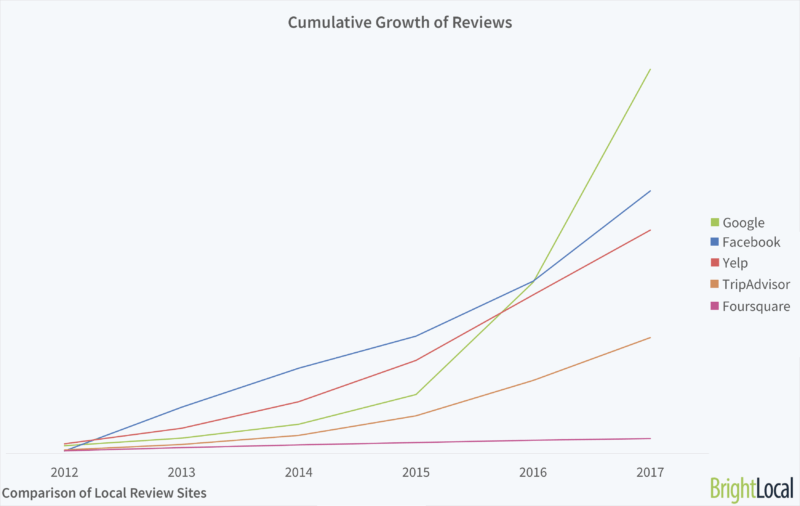
graph showing growth of reviews across multiple platforms

Source 

Google is the fastest-growing review site gaining the highest number of reviews compared to other platforms. Hence, businesses cannot afford to ignore the role of genuine and regular Google reviews in building a strong online reputation. Further, reviews offer valuable insights and measurable information about the target audience.

Read on to learn a few tested Google review-generating more tips to improve your search engine rankings and positively influence customer purchase decisions.

1. First things first: Provide kick-ass service

The importance of customer service in the business world cannot be understated. A McKinsey study reveals that 70 percent of buying experiences are dictated by how customers feel they are being treated. Delivering excellent customer service will not only make you stand out from the crowd but also encourage people to be your online brand advocates, writing reviews and recommendations for you. Do your job right! Make sure your staff has a good understanding of the product and is adept at treating customers well. Amazon is leading the way in delivering awesome customer service. The ecommerce giant is known to have the most customer-friendly return policies in the industry. Amazon protects its customers with its A-to-Z guarantee and takes full responsibility for damaged products or delayed delivery, even for third-party sellers.

2. Simply ask for it

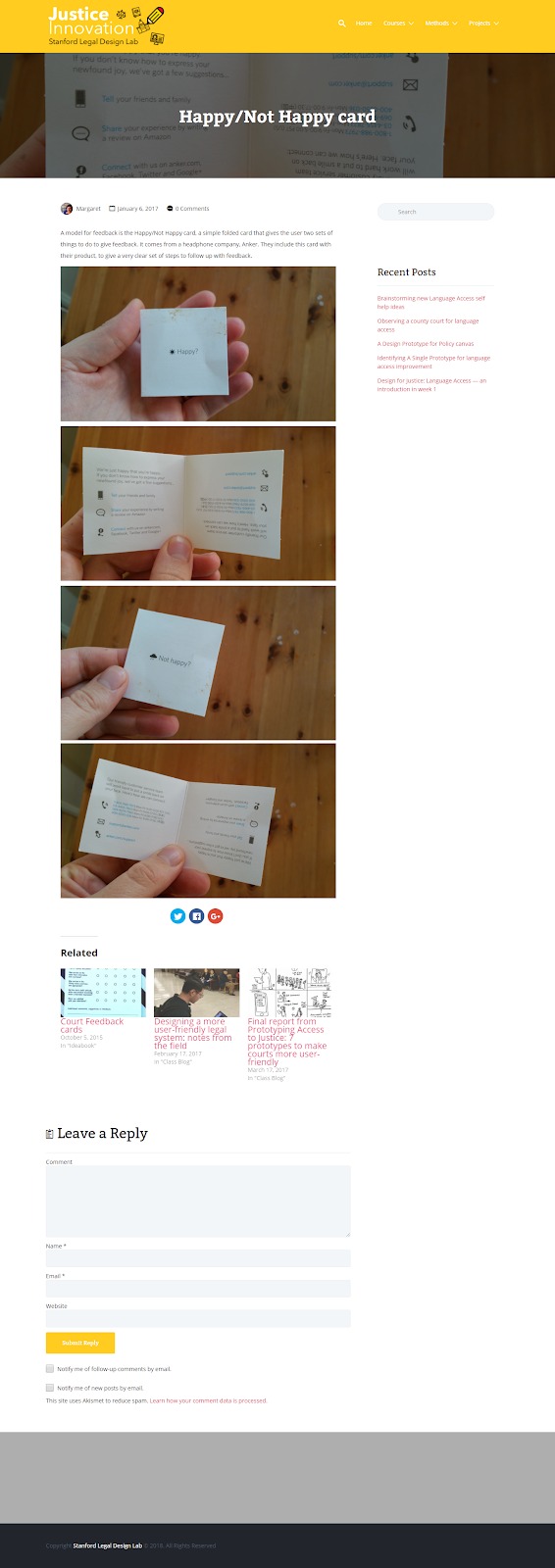
One of the easiest ways to procure Google reviews is to ask for it. Train your staff, especially the client-facing roles to request customers for their views and feedback. Further, simplify the process by giving clear bullet-point instructions with links, encouraging customers to leave a review. Notice how Anker, the global leader in electronic goods uses these Happy/Not Happy cards to encourage its customers to review its products. The card addresses both satisfied and unhappy customers, telling them what to do next.

example of getting customers to share their reviews

 Source 

Here are a few ways you can encourage your customers to review your business on Google.

  • In-person

Conversing with a satisfied customer in your store? Just addressed a customer’s concern on a support call? Use these pleasant interactions with clients as an opportunity to request for Google reviews.

  • Email

A personalized email campaign is an effective way to get more Google reviews. Keep the language in the email simple and specific. You can also use review-management tools like TrustPilot and ReviewTrackers that help automate product review invitations. These automated services send timely email reminders to your customers, urging them to write a review.

  • Leave-behind cards

Leave-behind cards attached to products can remind customers to give a written review on Google. Better still, add a QR code to simplify the process of posting a review. Consider using business cards, leave-us-a-review cards, counter cards, window clings, and door hangers to generate reviews for your business.

  • CTA or pop-ups

Customers often tend to procrastinate or miss out on posting reviews. Nudge such customers by including CTAs and pop-ups on your business page and mobile app. Typically, a pop-up like, “Hey, looks like you’re enjoying the read. Leave us a review!” can remind them to contribute a positive word. You can also add a CTA to your email signature in the form of a shortened link, taking them directly to the Google reviews page. For optimal results, make sure you solicit reviews at the right time of the customer journey. Ask for reviews when your customers have –

  • Used or experienced the product or service
  • Placed a repeat order
  • Tagged you on social media
  • Referred a new customer
  • Are spending a lot of time on your website or app

3. Encourage your customer service team to collect reviews

Your customer service team is the face of your business. They interact with customers on a daily basis, addressing queries and solving product or service-related issues. Hence, it’s critical to motivate them to get reviews for your business.

  •  Give them a script

Give your team a few examples of how they can invite reviews from customers. In an interview with Forbes, Daniel Vivarelli, the founder of Starloop, shares that it’s important to use the right phrases to remove the ‘sleaze’ factor and elevate your review request to a classy and sincere level.

Simply saying, “Will you please leave us a review on Google?” sounds obvious and awkward. Instead, train your employees to say something like,

“Thanks so much, Mr. Dorris! I am happy to learn that you are pleased with our services. I want to invite you to give an online feedback on Google. This will help us serve you even better.”

Sharing a few examples of such opening dialogues will help your staff speak the right language, making the process easier for them.

  • Offer an incentive

Use an incentive system to reward employees based on the number of Google reviews they have secured. This can be a big motivator for them to make asking for reviews a part of their routine.

Offer extra incentives if their name is mentioned in the Google review. Not all customer service personnel get mentioned in reviews. But those who do, have definitely lived up to the customer expectations. It is important to reward such employees.

4. Create a custom Google review link on your site or app

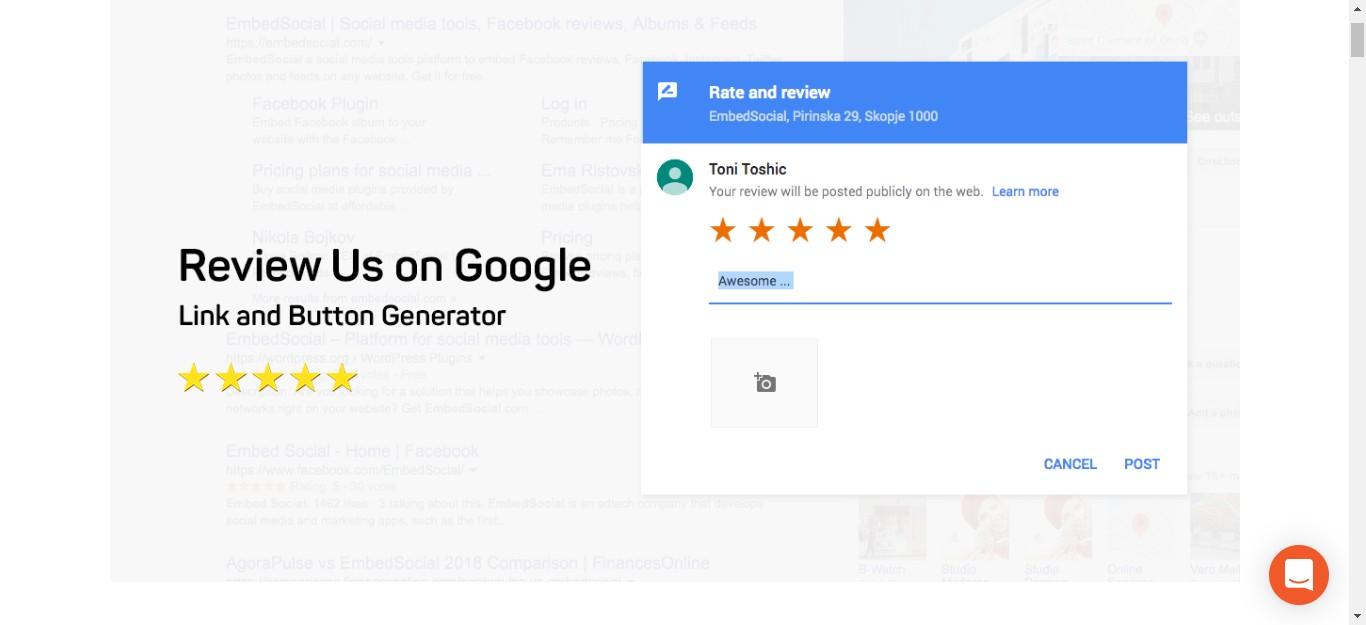
Merely pasting Google reviews on your website can hamper the authenticity and legitimacy of your site. In other words, if you control the review content customers are bound to doubt its genuineness. Adding a link to your Google reviews form on your business page can help potential customers quickly access what others have to say about your brand. Add a graphic or button on your page like “Read our Google reviews” and link it using your Places ID.

screenshot example of creating a custom Google review link on your site or app

Here’s how you can find your Place ID.

The complete link can then be used to direct your customers to the existing reviews page, encouraging them to add their own reviews.

screenshot example of a "Review us on Google" page

Source 

5. Negative or positive: Remember to respond to reviews

Online reviews are social proof of your credibility and online reputation. Whether positive or negative, it’s important to respond to reviews to let your customers know that you are all ears and willing to assist them. In fact, a study published by Harvard Business Review found that responding to customer reviews yields better ratings. Find time to respond to reviews, making your potential reviewers feel that it’s worth their time to write a review for you.

  • Positive reviews

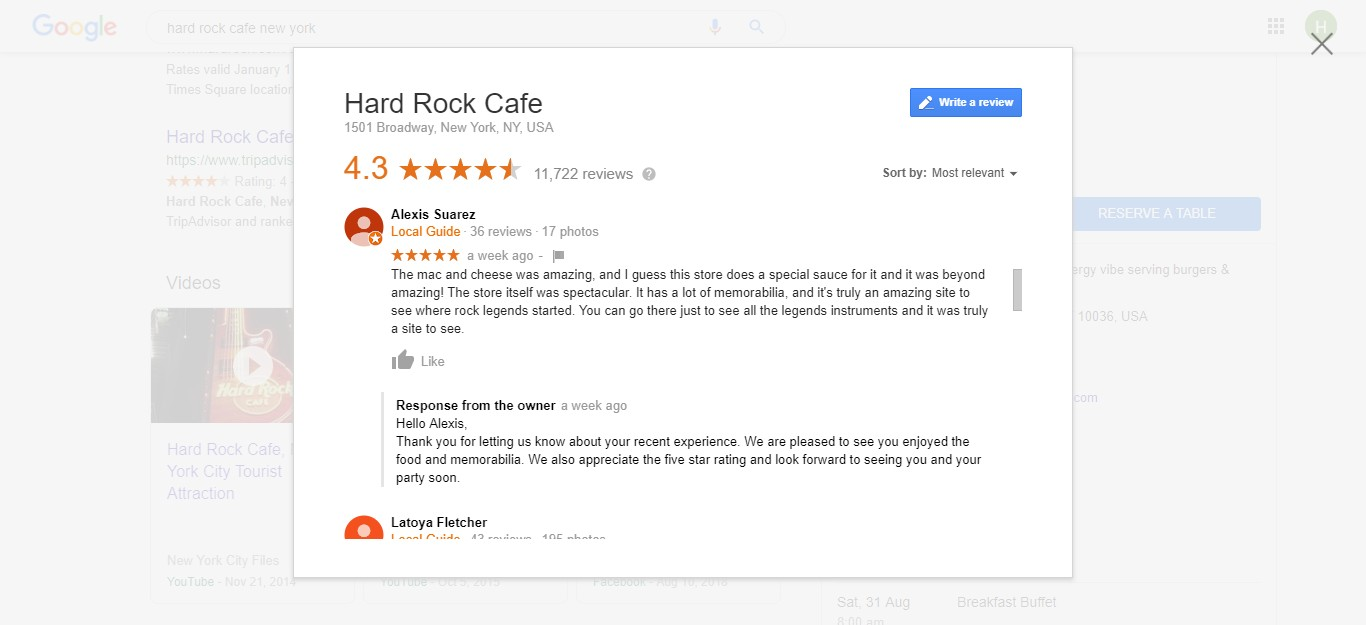
Positive reviews are great for your online reputation. Be specific and thankful when responding to such reviews. Notice how Hard Rock Cafe, New York uses this positive review as an opportunity to reinforce the brand’s strengths and convert its customers into a repeat customer.

screenshot of how Hard Rock Cafe responds to positive reviews

  • Neutral reviews

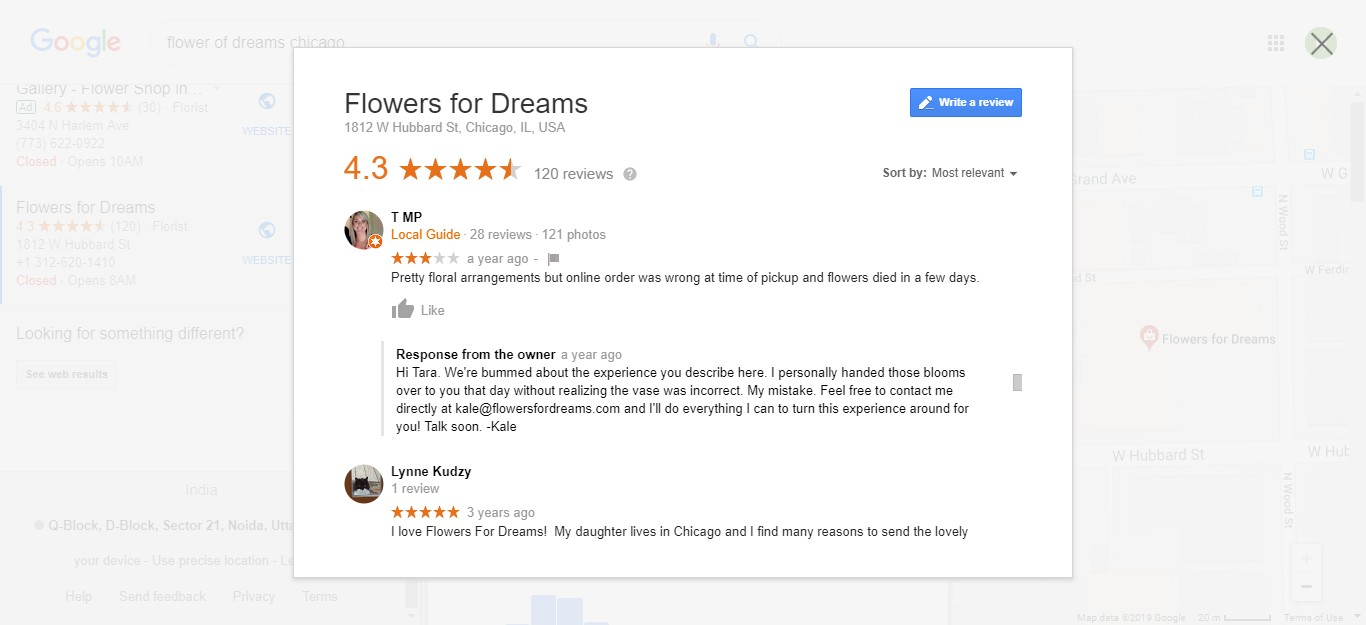
Reviews that are three-star ones lack details as the reviewer doesn’t strongly like or dislike your product or service. These reviews often carry negative and positive comments. Hence, you need to reinforce the positive and address the concern, to show your prospective reviewer that you care.

screenshot example of how Flowers for Dreams handles neutral reviews

Check out how the owner of Flowers of Dreams responds to a neutral comment posted by one of their customers. The response clearly shows that the business takes responsibility for an uncommon instance and desires to make things right for their customers.

  • Negative reviews

Here’s the good news: Negative reviews can boost conversions and brand loyalty. This is because too many positive reviews seem fake to customers. Negative reviews make your brand seem authentic and offer customers the worst-case scenario. Remember: Writers of negative reviews want you to fix their issue and convert them into happy customers. Follow these basic rules when responding to a negative query.

  • Be polite and empathetic.
  • Do not respond in a defensive manner.
  • Apologize and request to connect offline so you can address the customer’s concerns.

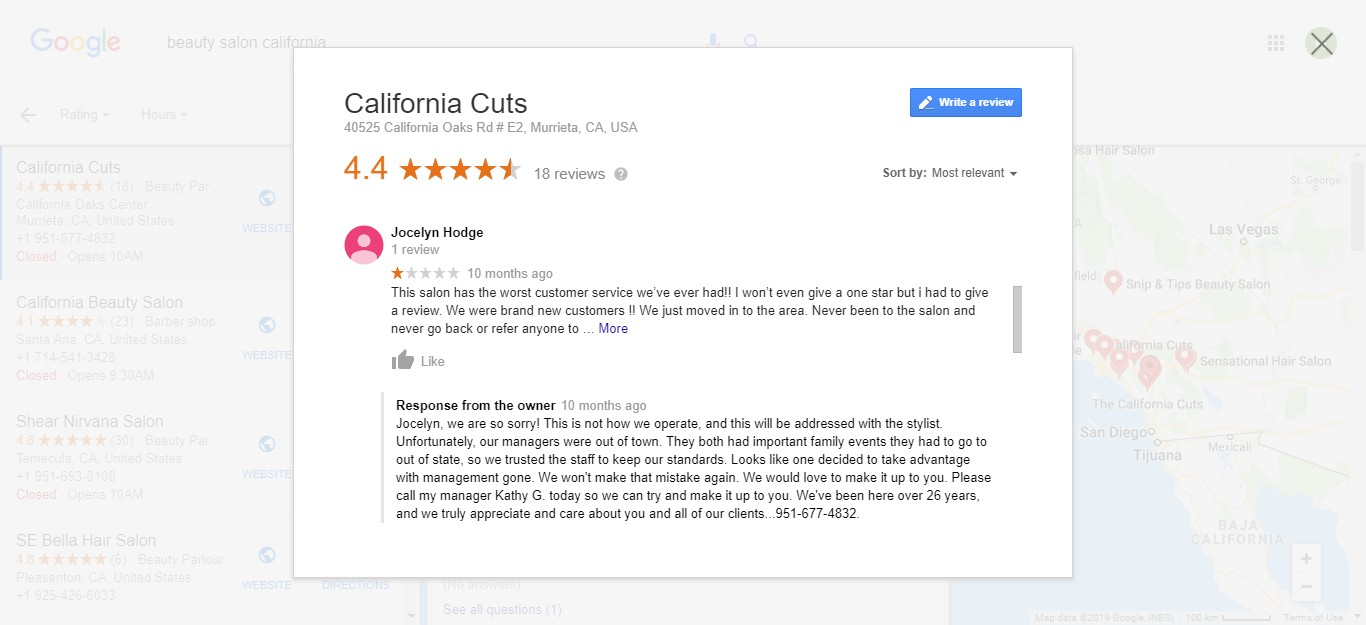
Notice how California Cuts responds to an unhappy customer by apologizing for the poor experience and taking the necessary steps to repair the damage.

screenshot example of how California Cuts handles negative reviews

When prospective reviewers see that you care to monitor and respond to customer reviews (even bad ones!), they will be encouraged to leave a Google review for you.

6. Address the WIIFM (What’s in it for me?)

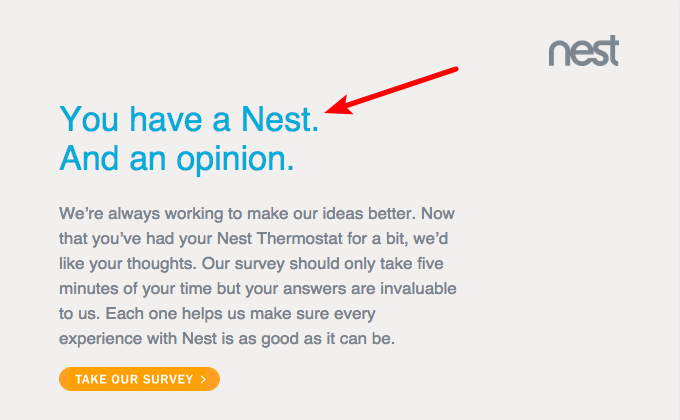
Sadly, most businesses only focus on managing immediate product-related queries or following up with customers for reviews, laying little emphasis on building long-term relationships. Customers are more likely to take the time to write a word for you when you tell them how their review will be used or add value to them. It is critical to use the right words when asking your customers to review your product. For instance, in this customer review invitation Nest uses less compelling words like ‘make our ideas better,’ offering little motivation for its customers to leave a review.

example of how how nest uses the "What’s in it for me?" aspect

Source: Thumbtack

On the other hand, Thumbtack uses powerful phrases like, “create a better experience for you”, putting customers in the position of a beneficiary and making them feel rewarded.

example of how Thumbstack uses power words to convey value to its costumers

Source: Thumbtack

Secondly, offer incentives to customers for writing a review. That way, you are encouraging them to leave a review (good, bad, or neutral) and that doesn’t amount to bribing.

example of rewarding customers for sharing their reviews

Source

Notice how this Kentucky-based chiropractic and wellness center doesn’t ask its patients to necessarily leave a positive review. They are offering a free adjustment for customers who leave “a review” not “a positive review”.

Addressing the “What’s in it for me?” will help your users see the direct benefit of spreading a positive word about you, motivating them to take the time to do so.

7. Host experiential events

Hosting a user conference or an industry event can help create a strong bond between your customers and the brand, creating conditions where they are likely to leave a review. That’s what experiential marketing is all about. Experiences don’t just sell products, they help your target audience connect with your brand’s core values. When customers are emotionally engaged, they will go out of their way to leave a review for you.


Source: YouTube

Check out how Oreo, one of the most popular cookies in the world, has used the 3D printing technology to allow customers to enjoy the cookie-making experience and receive uniquely flavored Oreo cookies. Such brand experiences coupled with a strong post-event feedback process can encourage people to leave reviews about the product.

Conclusion

Most customers read Google reviews to make a purchase decision. Reviews are a powerful marketing tool that should be used by marketers to improve online credibility, boost SEO, and drive conversions. The time-tested tips shared in this post will help you generate more Google reviews for your business, thereby strengthening your authority and online reputation.

George Konidis is the co-founder of Growing Search, a Canadian based digital marketing agency providing optimal SEO and link building services worldwide. He can be found on Twitter @georgekonidis.

The post Seven time-tested tactics to generate – Google reviews appeared first on Search Engine Watch.


from SEO – Search Engine Watch https://ift.tt/2FNhkUL
via IFTTT

Seven time-tested tactics to generate more Google reviews

A vast majority of customers find Google reviews posted by strangers just as trustworthy as personal recommendations. So how can businesses encourage customers to leave a review for them on Google?

A staggering 97 percent of customers depend on online reviews to make a purchase decision. Google reviews build and insulate brand reputation, thereby helping customers to make a decision in your favor. In fact, a new research study reveals that Google review stars form social proof for your brand, boosting your site’s CTR by over 35 percent.

No wonder, reviews are among the top in Google’s ranking factors 2019 list. Google’s algorithm gives a thumbs-up to sites having maximum reviews. In Moz’s Local Search Ranking Factors review signals (review quantity, review velocity, and review diversity) make up 13 percent of Google’s local 3 pack or finder ranking factors.

graph showing growth of reviews across multiple platforms

Source 

Google is the fastest-growing review site gaining the highest number of reviews compared to other platforms. Hence, businesses cannot afford to ignore the role of genuine and regular Google reviews in building a strong online reputation. Further, reviews offer valuable insights and measurable information about the target audience.

Read on to learn a few tested Google review-generating more tips to improve your search engine rankings and positively influence customer purchase decisions.

1. First things first: Provide kick-ass service

The importance of customer service in the business world cannot be understated. A McKinsey study reveals that 70 percent of buying experiences are dictated by how customers feel they are being treated. Delivering excellent customer service will not only make you stand out from the crowd but also encourage people to be your online brand advocates, writing reviews and recommendations for you. Do your job right! Make sure your staff has a good understanding of the product and is adept at treating customers well. Amazon is leading the way in delivering awesome customer service. The ecommerce giant is known to have the most customer-friendly return policies in the industry. Amazon protects its customers with its A-to-Z guarantee and takes full responsibility for damaged products or delayed delivery, even for third-party sellers.

2. Simply ask for it

One of the easiest ways to procure Google reviews is to ask for it. Train your staff, especially the client-facing roles to request customers for their views and feedback. Further, simplify the process by giving clear bullet-point instructions with links, encouraging customers to leave a review. Notice how Anker, the global leader in electronic goods uses these Happy/Not Happy cards to encourage its customers to review its products. The card addresses both satisfied and unhappy customers, telling them what to do next.

example of getting customers to share their reviews

 Source 

Here are a few ways you can encourage your customers to review your business on Google.

  • In-person

Conversing with a satisfied customer in your store? Just addressed a customer’s concern on a support call? Use these pleasant interactions with clients as an opportunity to request for Google reviews.

  • Email

A personalized email campaign is an effective way to get more Google reviews. Keep the language in the email simple and specific. You can also use review-management tools like TrustPilot and ReviewTrackers that help automate product review invitations. These automated services send timely email reminders to your customers, urging them to write a review.

  • Leave-behind cards

Leave-behind cards attached to products can remind customers to give a written review on Google. Better still, add a QR code to simplify the process of posting a review. Consider using business cards, leave-us-a-review cards, counter cards, window clings, and door hangers to generate reviews for your business.

  • CTA or pop-ups

Customers often tend to procrastinate or miss out on posting reviews. Nudge such customers by including CTAs and pop-ups on your business page and mobile app. Typically, a pop-up like, “Hey, looks like you’re enjoying the read. Leave us a review!” can remind them to contribute a positive word. You can also add a CTA to your email signature in the form of a shortened link, taking them directly to the Google reviews page. For optimal results, make sure you solicit reviews at the right time of the customer journey. Ask for reviews when your customers have –

  • Used or experienced the product or service
  • Placed a repeat order
  • Tagged you on social media
  • Referred a new customer
  • Are spending a lot of time on your website or app

3. Encourage your customer service team to collect reviews

Your customer service team is the face of your business. They interact with customers on a daily basis, addressing queries and solving product or service-related issues. Hence, it’s critical to motivate them to get reviews for your business.

  •  Give them a script

Give your team a few examples of how they can invite reviews from customers. In an interview with Forbes, Daniel Vivarelli, the founder of Starloop, shares that it’s important to use the right phrases to remove the ‘sleaze’ factor and elevate your review request to a classy and sincere level.

Simply saying, “Will you please leave us a review on Google?” sounds obvious and awkward. Instead, train your employees to say something like,

“Thanks so much, Mr. Dorris! I am happy to learn that you are pleased with our services. I want to invite you to give an online feedback on Google. This will help us serve you even better.”

Sharing a few examples of such opening dialogues will help your staff speak the right language, making the process easier for them.

  • Offer an incentive

Use an incentive system to reward employees based on the number of Google reviews they have secured. This can be a big motivator for them to make asking for reviews a part of their routine.

Offer extra incentives if their name is mentioned in the Google review. Not all customer service personnel get mentioned in reviews. But those who do, have definitely lived up to the customer expectations. It is important to reward such employees.

4. Create a custom Google review link on your site or app

Merely pasting Google reviews on your website can hamper the authenticity and legitimacy of your site. In other words, if you control the review content customers are bound to doubt its genuineness. Adding a link to your Google reviews form on your business page can help potential customers quickly access what others have to say about your brand. Add a graphic or button on your page like “Read our Google reviews” and link it using your Places ID.

screenshot example of creating a custom Google review link on your site or app

Here’s how you can find your Place ID.

The complete link can then be used to direct your customers to the existing reviews page, encouraging them to add their own reviews.

screenshot example of a "Review us on Google" page

Source 

5. Negative or positive: Remember to respond to reviews

Online reviews are social proof of your credibility and online reputation. Whether positive or negative, it’s important to respond to reviews to let your customers know that you are all ears and willing to assist them. In fact, a study published by Harvard Business Review found that responding to customer reviews yields better ratings. Find time to respond to reviews, making your potential reviewers feel that it’s worth their time to write a review for you.

  • Positive reviews

Positive reviews are great for your online reputation. Be specific and thankful when responding to such reviews. Notice how Hard Rock Cafe, New York uses this positive review as an opportunity to reinforce the brand’s strengths and convert its customers into a repeat customer.

screenshot of how Hard Rock Cafe responds to positive reviews

  • Neutral reviews

Reviews that are three-star ones lack details as the reviewer doesn’t strongly like or dislike your product or service. These reviews often carry negative and positive comments. Hence, you need to reinforce the positive and address the concern, to show your prospective reviewer that you care.

screenshot example of how Flowers for Dreams handles neutral reviews

Check out how the owner of Flowers of Dreams responds to a neutral comment posted by one of their customers. The response clearly shows that the business takes responsibility for an uncommon instance and desires to make things right for their customers.

  • Negative reviews

Here’s the good news: Negative reviews can boost conversions and brand loyalty. This is because too many positive reviews seem fake to customers. Negative reviews make your brand seem authentic and offer customers the worst-case scenario. Remember: Writers of negative reviews want you to fix their issue and convert them into happy customers. Follow these basic rules when responding to a negative query.

  • Be polite and empathetic.
  • Do not respond in a defensive manner.
  • Apologize and request to connect offline so you can address the customer’s concerns.

Notice how California Cuts responds to an unhappy customer by apologizing for the poor experience and taking the necessary steps to repair the damage.

screenshot example of how California Cuts handles negative reviews

When prospective reviewers see that you care to monitor and respond to customer reviews (even bad ones!), they will be encouraged to leave a Google review for you.

6. Address the WIIFM (What’s in it for me?)

Sadly, most businesses only focus on managing immediate product-related queries or following up with customers for reviews, laying little emphasis on building long-term relationships. Customers are more likely to take the time to write a word for you when you tell them how their review will be used or add value to them. It is critical to use the right words when asking your customers to review your product. For instance, in this customer review invitation Nest uses less compelling words like ‘make our ideas better,’ offering little motivation for its customers to leave a review.

example of how how nest uses the "What’s in it for me?" aspect

Source: Thumbtack

On the other hand, Thumbtack uses powerful phrases like, “create a better experience for you”, putting customers in the position of a beneficiary and making them feel rewarded.

example of how Thumbstack uses power words to convey value to its costumers

Source: Thumbtack

Secondly, offer incentives to customers for writing a review. That way, you are encouraging them to leave a review (good, bad, or neutral) and that doesn’t amount to bribing.

example of rewarding customers for sharing their reviews

Source

Notice how this Kentucky-based chiropractic and wellness center doesn’t ask its patients to necessarily leave a positive review. They are offering a free adjustment for customers who leave “a review” not “a positive review”.

Addressing the “What’s in it for me?” will help your users see the direct benefit of spreading a positive word about you, motivating them to take the time to do so.

7. Host experiential events

Hosting a user conference or an industry event can help create a strong bond between your customers and the brand, creating conditions where they are likely to leave a review. That’s what experiential marketing is all about. Experiences don’t just sell products, they help your target audience connect with your brand’s core values. When customers are emotionally engaged, they will go out of their way to leave a review for you.


Source: YouTube

Check out how Oreo, one of the most popular cookies in the world, has used the 3D printing technology to allow customers to enjoy the cookie-making experience and receive uniquely flavored Oreo cookies. Such brand experiences coupled with a strong post-event feedback process can encourage people to leave reviews about the product.

Conclusion

Most customers read Google reviews to make a purchase decision. Reviews are a powerful marketing tool that should be used by marketers to improve online credibility, boost SEO, and drive conversions. The time-tested tips shared in this post will help you generate more Google reviews for your business, thereby strengthening your authority and online reputation.

George Konidis is the co-founder of Growing Search, a Canadian based digital marketing agency providing optimal SEO and link building services worldwide. He can be found on Twitter @georgekonidis.

The post Seven time-tested tactics to generate more Google reviews appeared first on Search Engine Watch.


from SEO – Search Engine Watch https://ift.tt/2xtiO1J
via IFTTT

Tuesday, 2 July 2019

Three tools providing actionable competitive research insight

Spying on your competitors’ marketing efforts is one of the most efficient ways to come up with your our marketing campaigns, learn new tactics as well as predict the future of your niche.

The powerful driving source of any business is its competition. Competitors force us to move forward, implement changes and evolve.

I am not a big fan of competitive research unless you use the data right away to create your own marketing plan. Furthermore, I like plans that are pretty quickly turned into reality. I like action, so here are three competitive research tools that provide highly actionable insights:

1. Spy on your competitor’s traffic

Haven’t you wanted to know where exactly your competitors’ traffic and sales are coming from. Or how their landing pages convert? Or what are their best-performing keywords?

Nacho Analytics is a unique and innovative tool that will help you find answers to all the above questions and more. It uses its own database of “millions” of people who agreed to share their browsing history with the tool to help you spy on how they find and interact with your competitors’ pages.

Now, the most important part about the tool is that domain monitoring starts only when you add it to the tool. There’s no historical data available until you start monitoring any domain, so the earlier to add your competitors, the more data you’ll end up accumulating, with time.

Now, what sort of data is it?

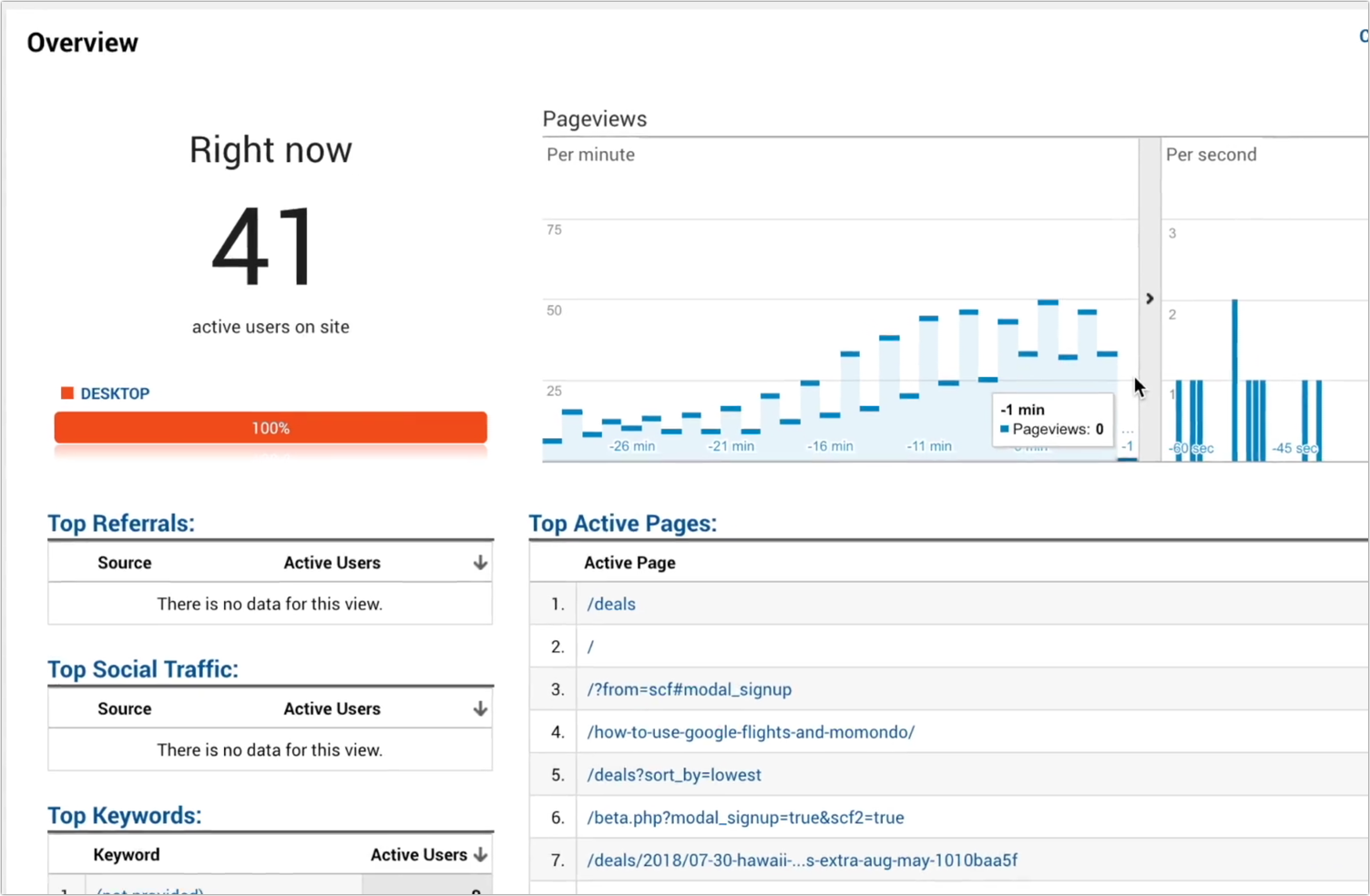
Nacho Analytics looks exactly as Google Analytics, so you’ll see all the reports there. The difference is, there’s no tracking code to install and that’s not your site you are tracking, which sounds even too good to be true, only it’s both good and real. Some of the competitive insights you’ll be able to obtain include:

  • Traffic sources (including conversions, page engagement metrics, etc. for each)
  • Lead sources
  • Conversion funnel analysis

In essence, you can do the same things with anyone else’s data that you do with your own: You can explore traffic acquisition tactics, see real-time data, identify best-performing CTAs, and more.

Screenshot of monitoring competitor's traffic

You can also share any data with anyone for free, similarly to how it works inside Google Analytics.

Nacho Analytics cheapest package is $39 and it allows you to track one competitor. For $79 a month, you’ll be able to monitor five competitors of yours.

2. Spy on your competitor’s backlinks

Ok, this one isn’t new: Monitoring competitors’ backlink acquisition methods help you create your own link building strategy as well as learn what not to do and how to avoid penalties.

But until now that was a pretty expensive and time-consuming process. Unless it’s your own site you are investigating, you had to pay for link research tools. And if you were dealing with a successful competitor, you had to go through thousands of lines before realizing how to sort and filter them to make sense of the data.

Therefore, I was pretty excited to discover this new backlink checker tool by Neil Patel which is free, available for use without the need to register and extremely usable.

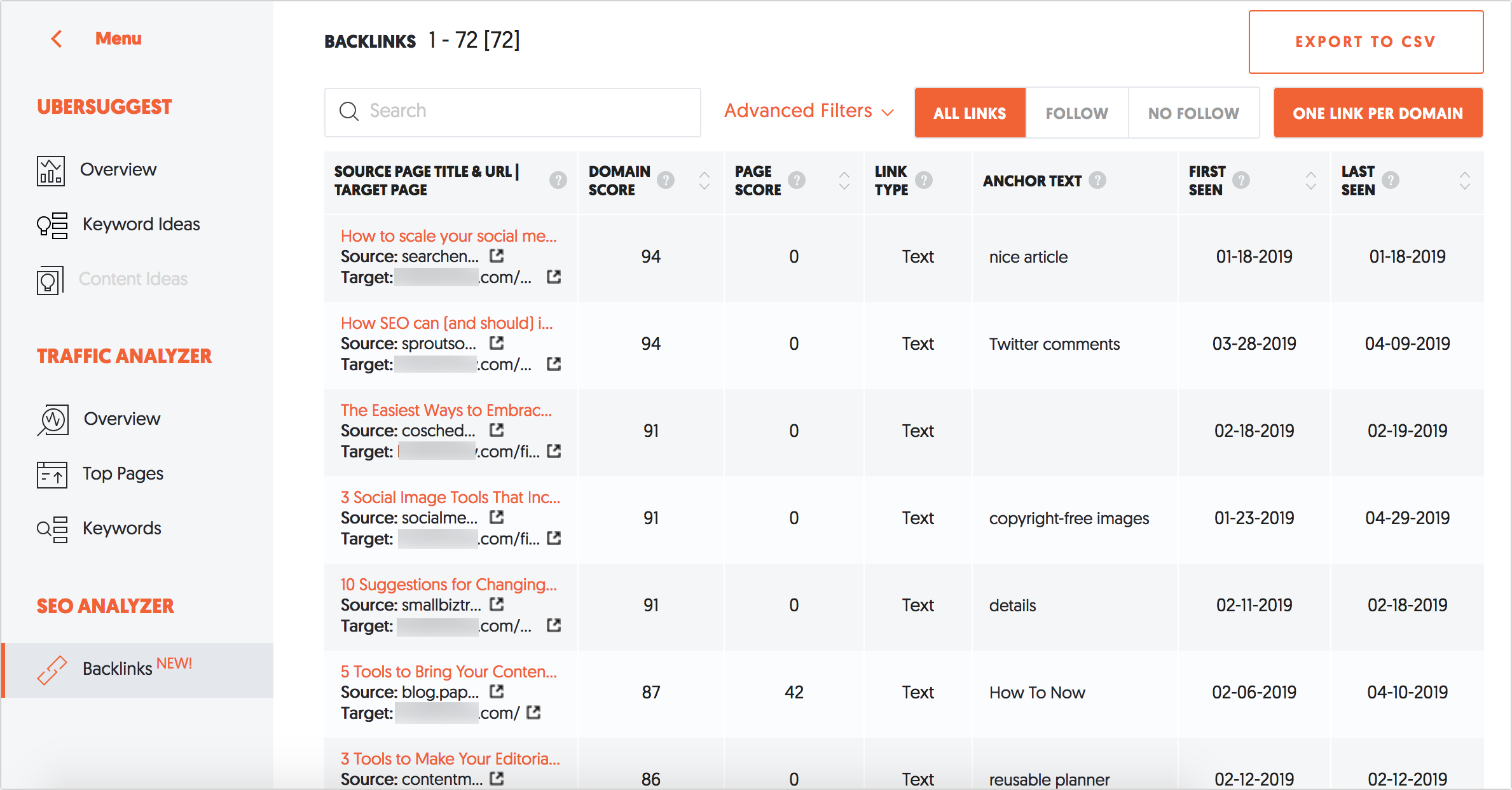
Simply copy-paste your competitor’s domain and the tool will generate the list of backlinks including:

  • The referring page title and URL
  • The target page URL
  • The link anchor text and type (text and image)

Now, there’s also a domain and link scores available but since I am not a fan of any link scoring (to put it mildly), I ignore those for the most part. Yet, if you come to think of those, you can actually use these numbers for sorting purposes. So, unless you miss a good link because of that, they might turn useful.

screenshot of monitoring competitor's back links

The advanced filtering is where the tool really shines. They make it so much easier to filter backlinks by identified patterns, including/excluding:

  • Keywords in the anchor text
  • Domains
  • Words in the URL

screenshot of exporting backlink reports in the Neil Patel backlinks tool

Finally, you can easily export the whole list in a CSV file to keep playing with the data.

Again, this tool is absolutely free, with no registration required.

3. Spy on your own missed keyword opportunities

This, again, is not such an innovative tactic but it’s the format and the tool that can make all the difference.

The best way to improve and diversify your rankings is to expand the list of keywords you are targeting, and the easiest way to discover new keywords is to see what your competitors are ranking for.

“Keyword gap” tactic is about identifying queries one or more of your competitors’ domains is ranking fairly high, while yours is nowhere to be found.

This Domain vs Domain tool takes this tactic to a new level:

  • It suggests competing domains for you to analyze
  • It generates a handy venn diagram showing how close the selected competitors are and how many more opportunities you can explore. The venn graphic is clickable allowing you to instantly load the keyword lists based on the overlap:

venn diagram showing the selected competitors' missed keyword opportunities

The tool also shows current rankings of each domain for each query, as well as its recent movement. The latter should be a signal for you to go ahead and check what they possibly did recently to see the ranking change.

The chart also shows Google search volume for each query. However, sadly, you cannot sort results by it. You can export the whole chart to a CSV or Excel file to obtain more sorting and filtering flexibility.

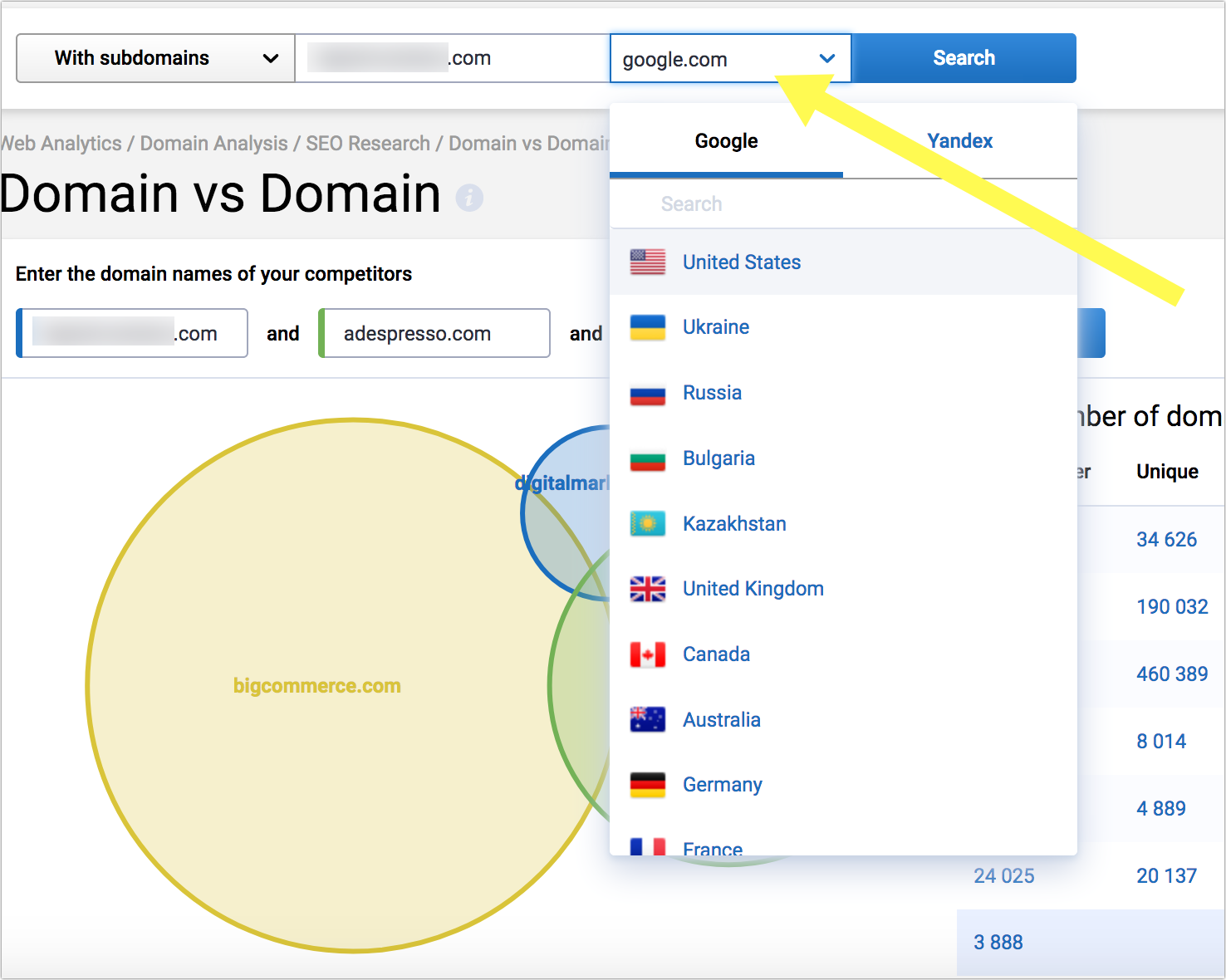
You can also select a search engine for the analysis which is a pretty amazing feature. I find it absolutely invaluable when clients are trying to enter a new market, especially the same-language market, like Google.ca or Google.co.uk

screenshot of selecting the region-wise domain to generate results

Being able which queries your competitors are ranking for in various versions of Google makes international SEO much easier and more predictable. There’s some more info on how to make the most of the feature.

The tool currently costs $19 per month but they are giving up on the cheapest plan this summer.

Which tools are you using to explore your competition and, more importantly, make use of the data? Please share in the comments!

Ann Smarty is the Brand and Community Manager at InternetMarketingNinjas.com. She can be found on Twitter @seosmarty.

The post Three tools providing actionable competitive research insight appeared first on Search Engine Watch.


from SEO – Search Engine Watch https://ift.tt/324LhZY
via IFTTT

Monday, 1 July 2019

Google Sandbox: Is it still affecting new sites in 2019?

Google Sandbox is a commonly believed filter that’s used by Google to prevent new websites from ranking high in Google’s Search Engine Results Pages (SERPs). It’s believed that Google uses this filter to put some restrictions on rankings for new websites.

The main idea behind it is that new websites may not be as relevant as the old ones. Moreover, some of them may even be spam.

While Google has never confirmed the existence of such a system, many SEOs believe that it exists. They claim so because they have seen such effects on websites that they are trying to rank. This is why it is extremely difficult to avoid being placed in the Google Sandbox when your domain is new.

So, does Google Sandbox still exist in 2019? If it still does, how do you avoid getting affected by it? Let’s take a deeper look into it.

The history of Google Sandbox

In 2004, a lot of SEOs found that their new websites weren’t ranking well on Google during their first few months. And this happened in spite of the best of their efforts. While their websites were easily indexed by Google, they weren’t able to rank well for even low-competition keywords. On the flip side, they were ranking well on other search engines such as Yahoo and Bing.

This effect of Google Sandbox lasted for several weeks and months and it varied for each website. The idea of such a system made sense because Google aimed to provide only the most authoritative and quality content to its users. Rand Fishkin from Moz believed that SEOmoz was in Google Sandbox for about nine months. This happened in spite of having a good backlink profile.

“SEOmoz is finally Sandbox free for the first time since our move to this domain nine months ago. We aren’t alone, either. Many folks had sites escape, and I’m happy for all of them. It looks like our 12,000+ all‐natural links (never link built for this site, just link‐baited) finally paid off.”

Rand Fishkin, Co‐founder Moz

In 2014, yet again, Google Sandbox caught the interest of SEOs and marketers when they saw that their new websites weren’t able to rank easily. Now that we know a brief history of Google Sandbox and what it can do, let’s look at how it is working in 2019.

What does Google say about Google Sandbox?

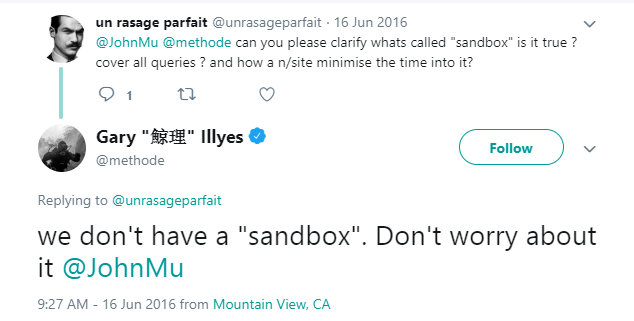
Google pretty much denies the existence of this Sandbox. In fact, you can see it through many tweets by Google’s employees.

Tweet exchange on the existence of the "sandbox" between a user and Gary Illyes

Source: Twitter

Even a Webmaster Trends Analyst at Google said the same thing –

“With regards to sandbox, we don’t really have this traditional sandbox that a lot of SEOs used to be talking about in the years past. We have a number of algorithms that might look similar, but these are essentially just algorithms trying to understand how the website fits in with the rest of the websites trying to rank for those queries. […] It’s always kind of tricky in the beginning when we have a new website and we don’t quite know where we should put it.”

John Mueller

However, the former head of webspam at Google did end up giving a few hints about it.

“My answer is not to worry that much. The difference between a domain that’s six months old versus one-year-old is really not that big at all. So as long as you’ve been around for a least a couple months, a few months, you should be able to make sure that you’re able to show up in the search results.”

Matt Cutts

Why does a new website not rank high on Google?

Google’s experts have mentioned that they need enough data to rank a site. A new website must show its expertise, authoritativeness, and trustworthiness to Google. Additionally, it should have a good backlink profile. However, it is very unlikely that a new website can win Google’s trust within a very short period of time.

Here are a few reasons why a new website may not rank high on Google.

1. Less content

To understand your website’s relevance to a certain topic, Google needs to go through your website’s pages. If your website doesn’t have enough content on it, Google may not be able to fully understand what your website is meant for.

2. Low on backlinks

Backlinks are one of the most important factors for ranking a website on Google. If your website has a weak backlink profile, Google may not rank it higher up in searches. Moreover, your website should have internal links that can allow link juice to pass through them. You might succeed in building loads of backlinks in a very short period of time but if they are not of high quality, Google may just ignore them.

You must also be very careful as rapidly grown backlink profiles may even give you penalties from Google.

3. Lesser user signals

Google may take time to analyze the behavioral data of your website visitors. For this reason, it may postpone ranking your website higher up in search results for popular keywords. It’ll observe things like click-through rate, dwell time, and bounce rate to see if your website is worthy of ranking higher up.

Now that you know why your website could be in the Google Sandbox, let’s figure out how you can get out of it quickly.

Is Google Sandbox still affecting sites in 2019?

There are many SEOs out there who claim that their website ranks high up in the search results within just a month of launching. On the other hand, there are other SEOs who believe that there is definitely some force that is stopping their websites from ranking in the search results during their first few months.

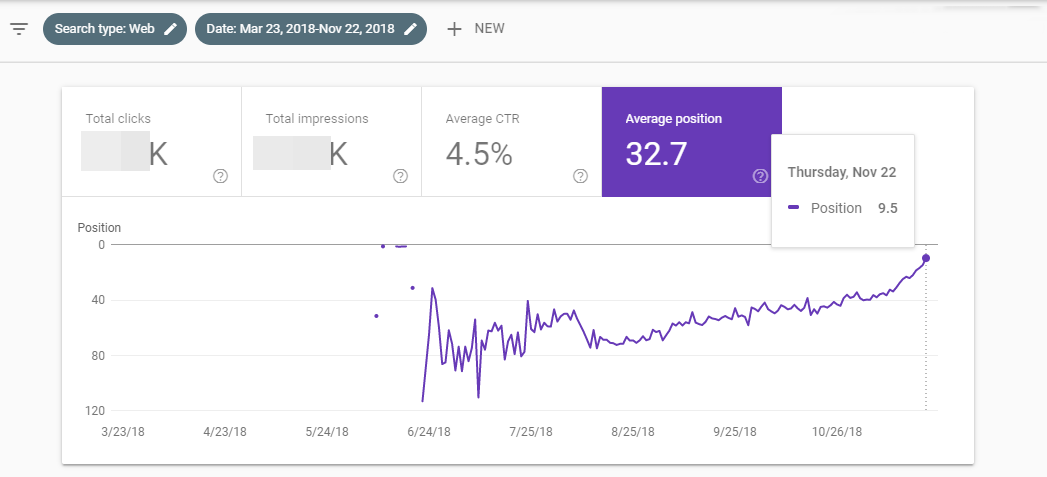
However, through our study, we found that even a new website can rank higher up in searches within a short time period. We launched our blog website in June 2018 and within just four months we managed to reach the first page of search results. As you can see in the screenshot, there is a huge fluctuation in the average position graph. This was the time when Google started collecting data about our website. You can notice from the chart that after two months, there was a consistent increase in the rankings. We got the 9.5 average position for the whole site in Google Search Console.

Google Search Console graph showing SERP position rankings

We also ranked a few other sites with higher volume keywords in less than six months. So, according to our research, Google Sandbox is a myth. With consistent efforts, you can rank high up in SERPs in a short duration.

What did we find during our study?

My own theory is almost the same as Google says. Google Sandbox doesn’t exist according to me. It could be possible that Google doesn’t prefer to rank new sites but it doesn’t mean that a new site can’t rank higher. Google wants to rank trusted and useful content. But for a new site, Google doesn’t have the required information to rank it. As soon as you are able to show to Google that you are genuine and trustworthy, you will start ranking higher.

I found that the ranking of a new site depends on its niche, competition, and your SEO strategy. These are the most important factors, according to me. For example, one of our sites started ranking with only social signals. It was a modeling niche site. We didn’t focus on link building for that site. We were just sharing its content on social media. In just a few weeks, keywords started ranking on the first page. Some higher competitive keywords were not ranking.

Rest of it depends upon your SEO strategy. Are you focusing on branding or rankings?

Let me explain, if you’re focusing on acquiring more links, it means you want rankings. But if you want links from top-tier high authority sites, means you are trying to build a brand. And Google loves brands. These days, Google is working for the future. SEO-friendly content and more backlinks are not enough to rank your website. You should focus on branding if you want to rank in a short time and for the long term. Try to get exposure, create online buzz, brand searches, and user satisfaction.

How to rank higher quickly?

While Google Sandbox can be annoying for new websites, there are methods you can use to get out of it quickly.

Here are a few things you can do:

1. Get your website indexed quickly

Your website may have already gone live, however, it doesn’t start aging in the eyes of Google unless it is actually indexed by it. To check if your website has been indexed by Google, you simply need to do a Google search. Just type “site:yourdomain.com” to check how many pages of your website have been indexed by Google.

If it has not been indexed yet, you need to get it done as soon as possible. To speed up the process, you can register the domain on Google Search Console and submit your XML sitemap.

2. Traffic

Getting traffic to your website is very important, especially in its early days. It is one factor that can help your website rank higher up and get out of Google Sandbox quickly. To get more visitors to your website, you should consider posting regularly in forums and groups on Facebook.

You can even try guest posting on other popular websites to drive traffic to your website and at the same time build a stronger backlink profile. You may also run ads on Facebook and other social media platforms to drive traffic.

3. Social signals

Social signals are important to gain the trust of Google because they indicate that your website is gaining popularity on social media platforms. A great way of using social signals to your advantage is that of running Facebook ads. You can publish an article on your blog and then run Facebook ads to drive traffic to it.

4. Choose long tail keywords

Google may not give you much traction for popular keywords earlier on when you are in the perceived Sandbox. However, you may be able to rank well for long tail keywords. To do this, you will first need to do keyword research and check the competition for every long tail keyword that you intend to target. You can use tools such as Ubersuggest and SEMrush to do this.

It is also a good idea to conduct competitor research and go after the keywords that they are ranking for. Using tools such as SEMrush, you can conduct competitor research by simply entering the URL of your competitor.

5. Build authority

“Google Shows Popular, Google doesn’t make you popular” – Google

Google wants authoritative, trustworthy, and user-friendly content to rank on top. As a new site, Google doesn’t know much about you because they don’t have enough data about your website.

So you should build authority and trust in the eyes of Google and users. Google will trust you if your site has good user-metrics, links, mentions from high-authority and relevant sites, and brand queries for your site. You should build more authority for your site.

6. Don’t be too aggressive

Focus on quality than quantity.

You may want to see your website high up in the SERPs. However, if you become too aggressive in promoting your website and link building, Google may see it as spam. You should try to acquire premium links for your new site. Only a few but premium links can change the picture.

Ideally, you shouldn’t build a huge number of links in a short period of time. Moreover, you should drip-feed the foundational links that you’ve built. Don’t optimize your anchor text too much, it’s preferable to keep it under-optimized. Lastly, make sure that you get good enough social signals.

It’s a good idea to give your website a slow and steady start. This will help it grow and prosper in the long run and will help in building more trust with Google. Once Google trusts you more, you can become slightly more aggressive in your link building methods.

7. Purchase an active website

One of the easiest ways of avoiding Google Sandbox is that of purchasing a website that is already active. You can do so by spending a decent sum of money on a website that has decent traffic and has been online for quite some time but has hardly any income.

Using tools such as Flippa, you can find websites which are already active and then can purchase and repurpose them to fit your requirements. Moreover, purchasing an already active website can help you figure out the power that the domain has by checking which keywords the website already ranks for.

Final thoughts

Maybe Google has some specific algorithms for new sites but it is still possible to rank a new site on Google. Don’t be aggressive from day one. Start slowly and then increase your SEO efforts over time. You should try to get links and mentions from high-authority sites, increase your brand searches, and user-satisfaction. I’m sure you will see that your newly launched website is ranking on Google.

What do you think about Google Sandbox and what is the best way of getting out of the Google Sandbox? Let us know in the comments.

Harpreet Munjal is the founder of the digital marketing company, LoudGrowth. He can be found on Twitter @munjalharpreet.

The post Google Sandbox: Is it still affecting new sites in 2019? appeared first on Search Engine Watch.


from SEO – Search Engine Watch https://ift.tt/2KS5IEc
via IFTTT

Social Media Today