Innovate not imitate!

Innovate not imitate!
Interested in the latest Growth hacks?

Welcome to our blog

Interested in the latest Growth hacks?

Welcome to our blog!

We want to help you start/manage and grow your business using innovative strategies and implementation. We have a passion for helping businesses and companies of various sizes see the same success that we have achieved.

Our skillsets are wide and varied, from business strategy, marketing, to online strategy. An increasing number of companies are turning to the internet and online media as a means to maximising their marketing reach and exposure. This is special area of focus for us and we do more than simple SEO strategies.

See our website for more: www.innovatetoaccelerate.com

Wednesday, 4 July 2018

How to keep your ecommerce site error free

Due to the large number of pages involved, ecommerce sites can see striking SEO improvements when errors on those pages are addressed. Let’s talk about what you need to do in order to keep your ecommerce site error free, starting with some tools, then walking you through some processes.

Monitoring and crawling tools

Monitoring and crawling tools are necessary in order to identify technical SEO errors. I consider the following tools essential:

  • ScreamingFrog: This is, hands down, one of the best SEO spider available out there for most uses. You will need this, or something very similar, to handle most of the errors we will be discussing in this post.
  • Google Search Console: Make sure you set up an account here for your domain, since it will notify you of errors that crawlers won’t necessarily be able to find.
  • Google Analytics: Check your analytics regularly for unexpected drops in organic search traffic, since these can point you to errors that you won’t necessarily find otherwise.

I also recommend using these tools to check for SEO various issues:

  • W3C Validator: Use this to validate the code on your homepage and page templates. You want to ensure your HTML is valid so the search engines can read it properly. Use it to validate your XML sitemaps as well.
  • WebPageTest: Use it to test how fast your pages are loading and which elements on your pages contribute the most to slowing down the site load.
  • MxToolBox DNS Check: Check for any DNS issues and talk to your host about any errors you find here.
  • Pingdom: Monitors your site uptime so you are notified if your site isn’t loading or has reliability issues.
  • SSL Labs Test: Make sure your SSL is working properly and isn’t deprecated.

404s (missing pages)

Missing pages hurt the user experience for obvious reasons, but they also hurt your SEO. Links that point to 404 pages throw away their authority.

To identify 404 pages, start by running a site crawl in ScreamingFrog. After finishing the crawl, go to “Response Codes,” then select “Client Error (4xx)” from the “Filter” dropdown menu.

Now export the list for later.

These are your high priority 404 errors, because they are missing pages that have been linked to from other pages on your own site.

For each page, identify whether there is a suitable replacement. If so, you will need to run a search and replace operation on your site to replace all references to the 404 page with the suitable replacement.

If there are no suitable replacements, you will need to remove links to the page so that there are no more broken links.

Additionally, you will need to set up 301 redirects from the missing pages to their replacements.

Do not merely set up 301 redirects without updating the links. Links that pass through 301 redirects lose some SEO authority to Google’s damping factor, and redirects put load on your servers.

Next you will need to identify your “lower priority” 404 pages. These are missing pages that you aren’t linking to from your own pages, but that other sites are linking to. This could be the result of old pages that you have removed, or it could be that the sites linking to you used the wrong URL.

You can find these in the Google Search Console by going to “Crawl” followed by “Crawl Errors” in the left navigation:


Choose “Not Found” and export your 404s.

Weed out the duplicate 404s that you have already addressed from ScreamingFrog. Now identify if any of these have a suitable replacement. If so, set up a 301 redirect to send users to the appropriate page.

Do not simply set up an all-encompassing rule to redirect all visits to missing pages so that they go to the homepage. This is considered a soft 404. Google does not like them, and they are the subject of our next section.

Soft 404s

A soft 404 is a missing page that doesn’t show up as a 404 to Google. Google explicitly warns against soft 404s, which come in two forms:

  • “Page Not Found” pages that look like 404s to users, but that return a success code and are indexable by the search engines.
  • 301 or 302 redirects to unrelated pages, such as the homepage. A redirect is meant to send users to the new location of a page, not to an off-topic page that will disappoint them.

Too many of either will hurt your authority with the search engines.

You can find soft 404s in the Google Search Console, also within the “Crawl Errors” section.

To resolve soft 404s, you may:

  • Remove a site-wide redirect policy that redirects all visits to missing pages to the homepage
  • Ensure that your missing pages properly return 404 status codes.
  • Institute a page-specific redirect if a suitable replacement is available.
  • Re-institute the page so that it is no longer missing. If you don’t know what was previously at the URL, you can use the Wayback Machine to see what used to be on the page, assuming it was crawled.
  • Allow the page to return a 404 status code if there are no suitable replacements, but be sure you are not linking to the page anywhere on your own site.

Do not get greedy with your redirects in an effort to capture PageRank, or you will send a message to the search results to treat your 301 pages like 404s.

Redirects

Before tackling anything else, you want to ensure that your site does not have any redirect chains or loops. These are series of redirects, where one redirect leads to another, etc. This bleeds PageRank through Google’s damping factor and creates server load. Redirect loops make pages inaccessible.
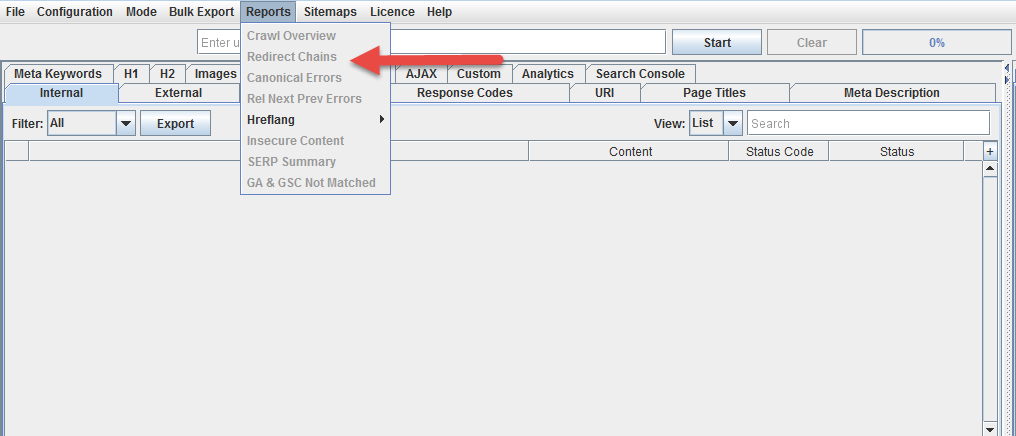
Replace any redirect chains with redirects directly from the relocated page to the new location.

Once you’ve addressed this, use  ScreamingFrog to identify your 301 and 302 redirects.

Start by addressing your 302 redirects, since these are supposed to be temporary. If any of them are actually permanent, they should be changed to 301 redirects so that the redirected page doesn’t remain in the index. Checking your 302s can also serve as a reminder to remove temporary redirects and reinstate forgotten pages.

After handling your 302s, the next step is to remove any links to redirected pages from your site, and replace them with links to the correct location. There are very few circumstances in which you actually want to link to a redirected page, since PageRank is lost through the redirect and server load is created. Use a search and replace operation to accomplish this.

Canonicalization

Canonicalization is a method of dealing with duplicate pages, which are very common for ecommerce sites. Canonicalization tells the search engines which version of the page to treat as the legitimate one. We talked about it in detail in our ecommerce SEO guide here, but these are some guiding principles:

  • Use canonicalization to address any URL variables that re-sort or filter the content without otherwise changing it.
  • Canonicalize any pages that are duplicated because they are listed in multiple categories.
  • Any paginated content should be canonicalized to a non-paginated full version.
  • Pages that are personalized based on the user should canonicalize to a non-personalized version.

To identify pages that may need canonicalization, use ScreamingFrog to identify duplicate title tags:
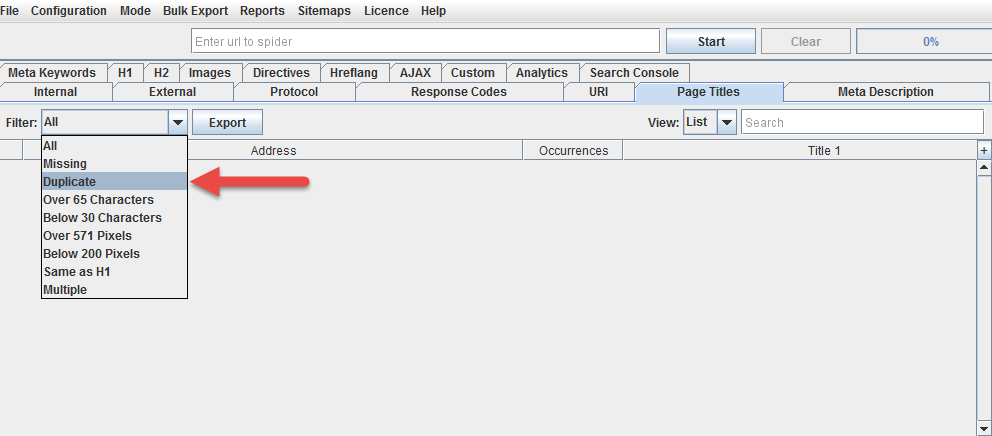
These are very often, though not always, duplicates of the same page.

Noindexing

Many ecommerce sites often have thousands or more pages, and quite a few of them may be very low in quality or content. Many may be very similar to one another without being pure duplicates. Many may feature manufacturer copy that is identical to what will be found on other ecommerce sites.

In some cases, then, it is a good idea to noindex some of your pages. Noindexing tells the search engines to remove the page from the search results. The noindex tag is thus a very dangerous toy to play with, and it’s important not to overuse it.

Here are a few pages that should definitely be noindexed:

  • Any admin or membership areas
  • Any part of the checkout system
  • “Thank you” or payment confirmation pages
  • Internal search results

A few warnings:

  • Never use “nofollow” on your own links or content. Always use <META NAME=”ROBOTS” CONTENT=”NOINDEX, FOLLOW”>. The “nofollow” tag tells the search engines to throw away your PageRank. It is never a good tag to use on your own content.
  • Do not canonicalize and noindex a page. Google has warned explicitly against this. In a worst case scenario this will noindex your canonical page, even if the noindex tag is only on the duplicates. More likely, it will treat the canonical tag as a mistake, but this means any authority shared between the duplicates will be lost.

HTML compliance

We mentioned earlier that you should run the W3C validator on your homepage and template pages to ensure you don’t have any serious html errors. While html errors are common and Google is fairly good about dealing with them, it’s best to clean up errors to send the clearest message possible to the search engines.

Use batch validation to check a larger number of pages.

Schema.org

Schema is a must for ecommerce sites because it allows you to feed the search engines useful meta data about your products like user ratings and prices that can lead to rich results in the search engines featuring star ratings and other stand out features.

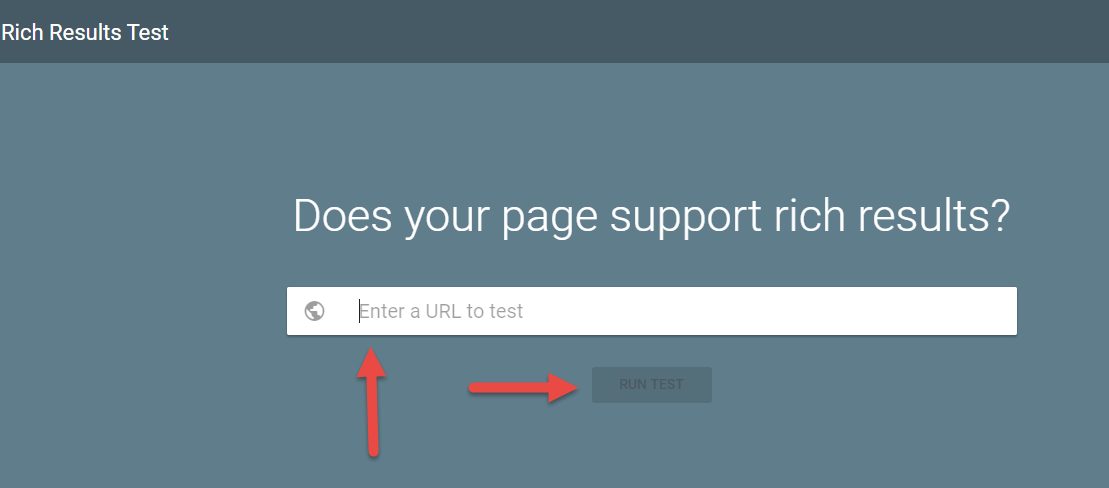
Review Google’s literature on rich results for products and include the proper schema to make it work. This schema code generator is useful for easily putting together the code for your templates, and you can test if your pages properly support rich results using Google’s own tool here.
Conclusion

Technical SEO is important in any industry, but due to the massive size of ecommerce sites, it is even more relevant for retailers. Keep your errors under control and your organic search traffic numbers will thank you.


from SEO – Search Engine Watch https://ift.tt/2zbfoVd
via IFTTT

Tuesday, 3 July 2018

The end of DoubleClick and Adwords? Google simplifies its branding with Google Ads, Marketing Platform and Ad Manager

It’s been 18 years since the launch of Adwords and it was about time for a change for Google. So many things have changed in almost two decades. Mobile has taken over our lives, social media has turned us into publishers and video content is in high demand. All the changes make businesses evaluate their digital strategies, that’s why Google has decided to rebrand its advertising, marketing, publishing platforms.

The idea is to simplify advertising and marketing while making integration and collaboration as simple as possible.

From now on, Google Adwords is renamed into Google Ads, DoubleClick advertiser products will be part of Google Marketing Platform, while DoubleClick for Publishers and DoubleClick Ad Exchange will be part of Google Ad Manager.

Google Ads

Google Ads is Google’s rebranding of all its advertising features on one platform. Adwords will retire soon in an attempt to help businesses go beyond words, as Adwords would imply, to prove that advertising has already moved away from its traditional methods.

Thus, Google Ads aims to simplify the advertising features with an increased focus on the UI interface and the best ways to bring out new ad opportunities for businesses.

In fact, there will also be a new campaign in Google Ads to help a business get started with online advertising. This should help smaller businesses discover the potential of online advertising without being lost among endless guidelines.

We are expecting to learn more details about these changes, but from what we’ve already read, it seems to be a great opportunity for businesses of all size to embrace the power of online ads to find new clients.

Even if you’re already a pro in Adwords, this change should simplify your daily tasks with a new environment that makes the process smoother.

Google Marketing Platform

Google’s Marketing Platform will bring together DoubleClick advertiser products with the Google Analytics 360 Suite. The new unified brand is bringing together ads and analytics to help marketers keep their advertising results in one place.

There’s no need to use multiple platforms to measure the performance of your ads and Google seems to be determined to promote simplicity across all its products.

The easier the process, the better the results and this should become appealing for smaller businesses to embrace the benefits of online advertising.

Marketing Platform will bring together all the existing integrations both from DoubleClick Digital Marketing and Analytics 360 suite. Moreover, it makes it easier to manage your campaigns with the introduction of Display & Video 360, which involves features from DoubleClick Bid Manager, Campaign Manager, Studio and Audience Centre. This should improve collaboration among creative and marketing teams to keep everything in one place. 

Moreover, DoubleClick Search is now renamed into Search Ads 360 to involve everything around the analysis and planning of your search campaigns.

What’s also useful is the fact that there will be more than 100 integrations with third-party ad solutions and measurement options to prove that Google is not only favouring its own products.

The rollout should start later on this month, but we don’t need to worry about the transition, as it will be gradual to allow us some time to get used to the changes.

Ad Manager

Google was looking for a new solution to bring together its publishing and monetisation options in one platform. Google Ad Manager is a combination of DoubleClick for Publishers and DoubleClick Ad Exchange.

The rising demand for programmatic access along with the growing need for content consumption brought a new platform that will help publishers, media companies and ad partners to explore the future of content and its business opportunities.

The new unified platform will make it easier for publishers to monetise their content while exploring its success across different devices. It’s the evolution of publishing and monetisation and it should make the process easier both for publishers and advertisers.

Another interesting point in this change is the realisation that monetisation is officially splitting into many different directions and it’s up to us to keep up with it. Google wants to make it easier to promote your content on different channels, devices, Accelerated Mobile Places, games, apps, or connected TVs. This brings us closer to the future of programmatic and it’s time to make it as easy and efficient as possible.

What’s next?

All these changes shouldn’t be scary for your digital plans, as Google wants them to be as gradual as possible. The new branding should roll out during the month, while the older platforms won’t cease to exist yet.

Google is also planning to provide us with more details within the month about the new platforms, their features and how we can use them as efficiently as possible from now on.

Even though the changes seem to focus on branding, it’s the simplicity and the look of the future that makes them more interesting. A good UI experience can actually present new opportunities for brands of all sizes.

Google acknowledges the need to look ahead and to take into consideration all the shifts in digital publishing and advertising that occurred the last decade.

More businesses will benefit from the simple interfaces with the monetisation of content and the measurement of ad campaigns.

Smaller businesses will enjoy the reduced friction in managing their ads and measuring their campaign performance, while we can’t ignore the focus on integration to bring out the best of each partner.

We’re still waiting to learn more details on all the changes, but from what we know up to now, this may be the beginning of an era of simplicity yet improved effectiveness.


from SEO – Search Engine Watch https://ift.tt/2tXQzWU
via IFTTT

Writing SEO meta descriptions in 2018: best practice across mobile and desktop

Back in 2016, my colleague Christopher Ratcliff wrote an excellent how-to guide about meta descriptions here at Search Engine Watch.

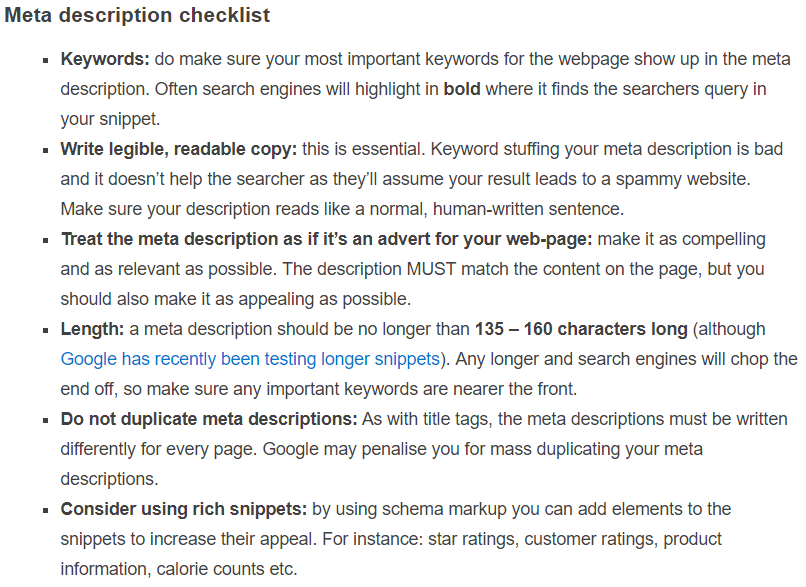
Much of what is included in that article is still useful. The good and bad examples Chris analyses are still on point and you would do a lot worse than to write your own descriptions according to his takeaway checklist even two years down the line.

But as is case in the world of search, things are always changing. SEO copywriters and marketers need to be adapting to an ever-evolving SERP landscape across multiple screens and taking into consideration Google’s oft-tweaked algorithm.

Google is increasingly unpredictable with how it displays meta descriptions. Today, the length at which it truncates descriptions can vary significantly from result to result. Sometimes the service will auto-generate descriptions or amend them. We are even seeing SERPs with far less descriptions in use at all with the rise of other rich features such as answer boxes and carousels.

Let’s take a look at some examples and consider meta description best practice for 2018.

First things first – what are meta descriptions?

Meta descriptions are a short piece of written content marked up in the HTML of a webpage.

Good examples typically elaborate on the information given in the title tag and aim to entice the searcher to click through. They might give a flavour of the content on that particular page by describing it…

…or providing an excerpt…

They sometimes give a broader description of the site.

And if the result is a branded one, the meta description might describe the brand more generally.

We often associate meta descriptions with the grey text displayed under the URL in the search results. They also appear when pages are shared on social channels like Twitter and Facebook.


Descriptions can also be tweaked specifically for Facebook optimization using Open Graph markup and for Twitter using Twitter Cards.

Meta description lengths – they’re changing

Until very recently, it was standard practice for Google to set a fairly predictable limit for how long meta descriptions could be. As Chris highlights in his last piece, we could expect descriptions typically being truncated at around 135-160 characters. But this is no longer the case.

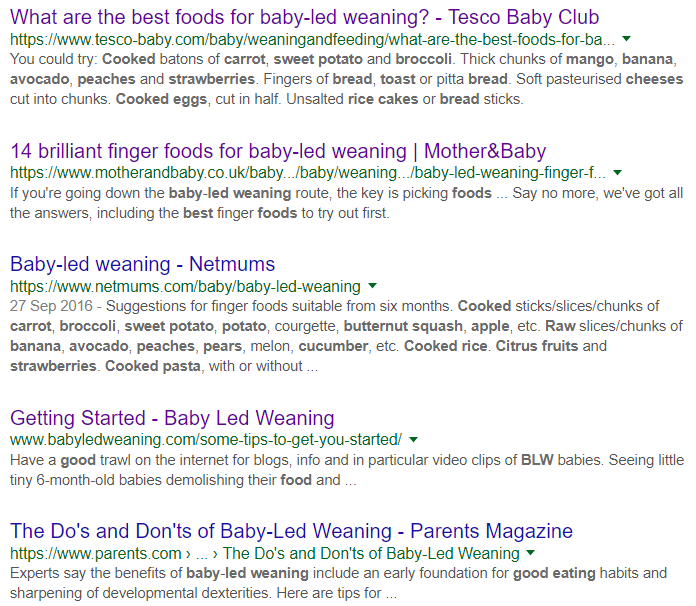
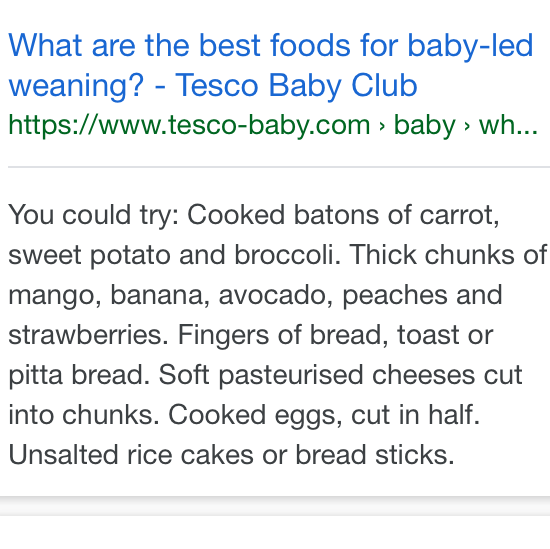
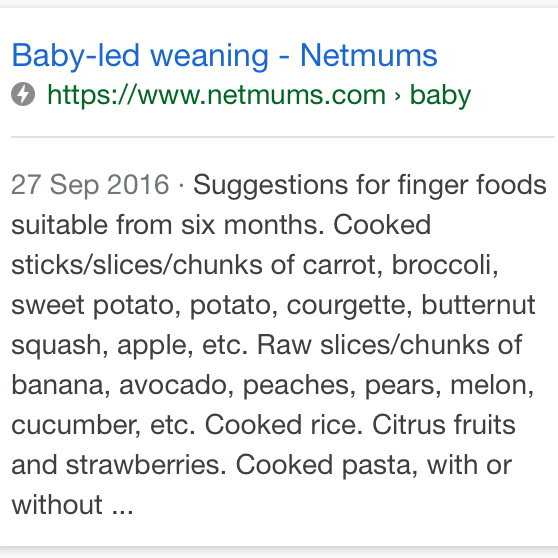
The above example SERPs (for the phrase ‘best baby led weaning foods’) include a meta description for Netmums being truncated at around 330 characters, as well as shorter descriptions more in keeping with the classic 135-160 character length.

We can also infer from this that Google’s algorithm is judging the usefulness of the meta description – choosing to include more if it’s likely to answer the query of the searcher quickly.

We can also see the Mother & Baby result clearly looking like it has been written with traditional character limits in mind. It is still, I’d argue, the most persuasive description of the bunch in terms of making me want to click. But, we can clearly see from this results page that experimenting with longer meta descriptions is now an option for marketers.

Variations between mobile and desktop?

When it comes to thinking about our search results in the mobile context, is Google more harsh with how long meta descriptions can be on smaller screens? Surely the search engine wants to devote more space to links and titles, than descriptions?

Let’s compare the above results with how they fair on mobile SERPs.

The short answer: there is – for this query at least – very little difference between how Google is presenting the descriptions across screens.

We need to accept a number of caveats. This is just one query, in one niche, across just a couple of devices, but it is quite illuminating. Both of the longest meta descriptions from the desktop SERPs are kept at the same length on mobile.

But that’s not to say Google isn’t making some amendments for SERPs on handheld devices.

The well-crafted Mother & Baby result is being tightened up by a few characters, cutting out “finger friendly. Say no more, we’ve got all the answers, including”. If we dive into the source text, we can get a better picture of what’s going on.

In this case, Google is being pretty smart about truncating the marked-up meta description in order to favor text from the page that includes some keywords. It is doing this across desktop and – to a slightly more severe extent – on mobile.

But the rule is not as simple as assuming mobile descriptions need to be shorter. As the earlier examples prove, if the description includes relevant key phrases or is doing a good job at answering the query, Google is happy to include longer snippets – even on mobile.

Meta descriptions in the era of rich features

Google is clearly always improving at understanding our intent as searchers.

Its algorithm makes a jugdgement on this before deciding how much or how little a description snippet to include. But it may well decide to include many rich features in the SERPs. These include answer boxes, information graphs – as well as elements in and around the description itself, such as star ratings and ‘jump to…’ links.

As I covered in a recent piece about visibility in modern day SERPs, it depends on how well marked up your content is in order for the search engine to include these features.

Interestingly, for all the rich functionality of today’s SERPs, the humble meta description is still incredibly important. In fact, with Google’s willingness to present longer descriptions – we could even argue that well-crafted 300 character descriptions could improve visibility as well as CTRs.

Google is increasingly smart, but it does its best job if it is obvious from the way our content is written and marked up. The trick is getting the balance right with ensuring your markup is alerting the search spiders to the relevant information on your page and ensuring that your meta description is useful to your reader.

Google will have the final say with whether it deems other content on your site as more useful depending on the intent of your searcher – and may well display a tweaked snippet accordingly. If it has that option, thanks to the effort we put into our onsite SEO, we can expect the best experience for our searchers.


from SEO – Search Engine Watch https://ift.tt/2MJLHfP
via IFTTT

How to Optimize Car Dealership Websites

Posted by sherrybonelli

Getting any local business to rank high on Google is becoming more and more difficult, but one of the most competitive — and complex — industries for local SEO are car dealerships. Today’s car shoppers do much of their research online before they even step into a dealership showroom. (And many people don’t even know what type of car they even want when they begin their search.)

According to Google, the average car shopper only visits two dealerships when they’re searching for a new vehicle. That means it’s even more important than ever for car dealerships to show up high in local search results.

However, car dealerships are more complex than the average local business — which means their digital marketing strategies are more complex, as well. First, dealers often sell new vehicles from several different manufacturers with a variety of makes and models. Next, because so many people trade in their old cars when they purchase new cars, car dealers also sell a variety of used vehicles from even more manufacturers. Additionally, car dealerships also have a service department that offers car maintenance and repairs — like manufacturer warranty work, oil changes, tire rotations, recall repairs, and more. (The search feature on a car dealer’s website alone is a complex system!)

Essentially, a car dealer is like three businesses in one: they sell new cars, used cars, AND do vehicle repairs. This means your optimization strategy must also be multi-faceted, too.

Also, if you look at the car dealerships in your city, you will probably find at least one dealership with multiple locations. These multi-location family of dealerships may be in the same city or in surrounding cities.

Additionally, depending on that family of dealerships, they may have one website or they might have different websites for each location. (Many auto manufacturers require dealers to have separate websites if they sell certain competitors’ vehicles.)

So if you’re helping car dealers with SEO, you must be thinking about the various manufacturers, the types of vehicles being sold (new and used), the repair services being offered, the number of websites and locations you’ll be managing, manufacturer requirements — among other things.

So what are some of the search optimization strategies you should use when working with a car dealership? Here are some SEO recommendations.

Google My Business

Google My Business has been shown to have a direct correlation to local SEO — especially when it comes to showing up in the Google Local 3-Pack.

One important factor with Google My Business is making sure that the dealership’s information is correct and contains valuable information that searchers will find helpful. This is important for competitive markets — especially when only a handful of sites show up on the first page of Google search results. Here are some key Google My Business features to take advantage of:

Name, address, and phone number

Ensure that the dealership’s name, address and phone number is correct. (If you have a toll-free number, make sure that your LOCAL area code phone number is the one listed on your Google My Business listing.) It’s important that this information is the same on all local online directories that the dealership is listed on.

Categories

Google My Business allows you to select categories (a primary category and additional categories) to describe what your dealership offers. Even though the categories you select affect local rankings, keep in mind that the categories are just one of many factors that determine how you rank in search results.

  • These categories help connect you with potential customers that are searching for what your car dealership sells. You can select a primary category and additional categories – but don’t go overboard by selecting too many categories. Be specific. Choose as few categories as possible to describe the core part of your dealership’s business.
  • If the category you want to use isn’t available, choose a general category that’s still accurate. You can’t create your own categories. Here are some example categories you could use:
    • Car Dealer
    • Used Car Dealer
    • BMW dealer
  • Keep in mind that if you’re not ranking as high as you want to rank, changing your categories may improve your rankings. You might need to tweak your categories until you get it right. If you add or edit one of your categories, you might be asked by Google to verify your business again. (This just helps Google confirm that your business information is accurate.)

Photos

Google uses photo engagement on Google My Business to help rank businesses in local search. Show photos of the new and used cars you have on your dealership’s lot — and be sure to update them frequently. After you make a sale, make sure you get a photo consent form signed and ask if you can take a picture of your happy customers with their new car to upload to Google My Business (and your other social media platforms.)

If you’re a digital marketing agency or a sales manager at a dealership, getting your salespeople to upload photos to Google My Business can be challenging. Steady Demand’s LocalPics tool makes it easy for salespeople to send pictures of happy customers in their new cars by automatically sending text message reminders. You simply set the frequency of these reminders. The LocalPics tool automatically sends text messages to the sales reps reminding them to submit their photos:

All the sales reps have to do is save their customers’ photos to their phone. You set up text message reminders to each sales rep and when they get the text message reminder, the sales team simply has to go into their smartphone’s pictures and upload their images through the text message, and the photos are automatically posted to the dealership’s Google My Business listing! (They can also text photos to their Google My Business anytime they want as well — they don’t have to wait for the reminder text messages.)

Videos

Google recently began allowing businesses to upload 30-second videos to their Google My Business listing. Videos are a great way to show off the uniqueness of your dealership. These videos auto-play on mobile devices — which is where many people do their car searching on — so you should include several videos to showcase the cars and what’s going on at your dealership.

Reviews

Online reviews are crucial for when people search for the right type of car AND the dealership they should purchase that car from. Make sure you ask happy customers to leave reviews on your Google My Business listing and ensure that you keep up by responding to all reviews left on your Google My Business listing.

Questions & Answers

The Google My Business Q&A feature has been around for several months, yet many businesses still don’t know about it — or pay attention to it. It’s important that you are constantly looking at questions that are being asked of your dealership and that you promptly answer those questions with the correct answer.

Just like most things on Google My Business, anyone can answer questions that are asked — and that means that it’s easy for misinformation to get out about your dealership and the cars on your lot. Make sure you have a person dedicated on your team to watch the Q&As being asked on your listing.

Also, be sure to frequently check your GMB dashboard. Remember, virtually anyone can make changes to your Google My Business listing. You want to check to make sure nobody has changed your information without you knowing.

Online directories (especially car directories)

If you’re looking for ways to improve your dealership’s rankings and backlink profile, online automotive directories are a great place to start. Submitting your dealership’s site to an online automotive directory or to an online directory that has an automotive category can help build your backlink profile. Additionally, many of these online directories show up on the first page of Google search results, so if your dealership isn’t listed on them, you’re missing out.

There are quite a few paid-for and free automotive online directories. Yelp, YellowPages, Bing, etc. are some of the larger general online directories that have dedicated automotive categories you can get listed on for free. Make sure your dealership’s name, address, and phone number (NAP) are consistent with the information that you have listed on Google My Business.

Online reviews

Online reviews are important. If your dealership has bad reviews, people are less likely to trust you. There are dedicated review sites for vehicle reviews and car dealership reviews. Sites like Kelley Blue Book, DealerRater, Cars.com, and Edmunds are just a few sites that make it easy for consumers to check out dealership reviews. DealerRater even allows consumers to list — and review — the employees they worked with at a particular dealership:

If they have a negative experience with your dealership — or one of your employees — you can bet that unhappy customer will leave a review. (And remember that reviews are not only left about your new and used car sales — they are also left about your repair shop as well!)

There are software platforms you can install on your dealership’s site that make it easier for customers to leave reviews for your dealership. These tools also make it simple to monitor and deflect negative reviews to certain review websites. (It’s important to note that Google recently changed their policies and no longer support “review gating” — software that doesn’t allow a negative review to be posted on Google My Business.)

NOTE: Many automotive manufacturers offer dealerships coop dollars that can be used for advertising and promotions; however, sometimes they make it easier for the dealers to get that money if they use specific turnkey programs from manufacturer-approved vendors. As an example, if you offer a reputation marketing software tool that can help the dealership get online reviews, the dealership may be incentivized to use DealerRater instead because they’ve been “approved” by the manufacturer. (And this goes for other marketing and advertising as well — not just reputation marketing.)

Select long-tail keywords

Selecting the right keywords has always been a part of SEO. You want to select the keywords that have a high search frequency, mid-to-low competitiveness, ones that have direct relevance to your website’s content — and are keyword phrases that your potential car buyers are actually using to search for the cars and services your dealership offers.

When it comes to selecting keywords for your site’s pages, writing for long-tailed keywords (e.g. “2018 Ford Mustang GT features”) have a better chance of ranking highly in Google search results than a short-tailed and generic keyword phrase like “Ford cars.”

Other car-related search keywords — like “MSRP” and “list prices” — are keywords you should add to your arsenal.

Optimize images

According to Google, searches for "pictures of [automotive brand]" is up 37% year-over-year. This means when you’re uploading various pictures of the cars for sale on your car lot, be sure to include the words “pictures of” and the brand name, make, and model where appropriate.

For instance, if you’re showing the interior of the 2018 Dodge Challenger, you may want to name the actual picture image file “picture-of-dodge-challenger-2018-awd-front-seat-interior.png” and use the alt tag “Pictures of Dodge Challenger 2018 AWD Front Seat Interior for Sale in Cedar Rapids.”

As with everything SEO-related, use discretion with the “pictures of” strategy. Don’t overdo it, but it should be a part of your image optimization strategy to a certain extent on specific car overview pages.

Optimize for local connections

One thing many car dealerships fail to realize is how important it is to make local connections — not only for local SEO purposes but also for community trust and support as well. You should make a connection on at least one of the pages on your site that relates to what’s going on in your local community/city.

For instance, on your About Us page, you may want to include a link to a city-specific page that talks about what’s going on in your city. Is there a July 4th parade? And if so, are you having a float or donating a convertible for the town’s mayor to ride in? If you sponsor a local charity or belong to the Chamber of Commerce, it’d be great to mention it on one of these localized pages (mentioning your city’s name, of course) and talk about what your dealership’s role is and what you do. Is there an upcoming charity walk or do you donate to your local animal shelter? Share pictures (and be sure to use alt tags) and write about what you’re doing to help.

All of this information not only helps beef up your local SEO because you’re using the city’s name you’re trying to rank for, but it also creates good will for future customers. Additionally, you can create links to these various charities and organizations and ask that they, in turn, create a link to your site. Local backlinking at its best!

Schema

If you want to increase the chances of Google — and the other search engines — understanding what your site’s pages are about, using schema markup will give you a leg-up over your competition. (And chances are your car dealership competitors aren’t yet using schema markup.)

You’ll want to start by using the Vehicle “Type” schema and then markup each particular car using the Auto schema markup JSON-LD code. You can find the Schema.org guidelines for using Schema Markup for Cars on Schema.org. Below is an example of what JSON-LD schema markup looks like for a 2009 Volkswagen Golf:

Listen to the SEO for Car Dealerships podcast episode to learn EVEN MORE!

If you want to learn even more information about the complexities of car dealerships and search optimization strategies, be sure to listen to my interview on MozPod’s SEO for Car Dealerships.

In this podcast we’ll cover even more topics like:

  • What NOT to include in your page’s title tag
  • How to determine if you really own your dealership’s website or not
  • How to handle it if your dealership moves locations
  • Why using the manufacturer-provided car description information verbatim is a bad idea
  • Does “family owned” really matter?
  • How to handle car dealers with multiple locations
  • How to get creative with your Car Service pages by showing off your employees
  • Why blogging is a must-do SEO strategy and some topic ideas to get you started
  • Ways to get local backlinks
  • Tips for getting online reviews
  • What other digital marketing strategies you should try and why
  • And more

Sign up for The Moz Top 10, a semimonthly mailer updating you on the top ten hottest pieces of SEO news, tips, and rad links uncovered by the Moz team. Think of it as your exclusive digest of stuff you don't have time to hunt down but want to read!


from The Moz Blog https://ift.tt/2KvJIPt
via IFTTT

Monday, 2 July 2018

Meta Keywords Use Not a Spam Signal, But Not Used by Google

Meta keywords were one of the early meta tags, but as it is something that could easily be spammed, search engines started to phase out its usage over the years.  And some search engines still use it and many CMS still have that section active for site owners to add to pages.  But because meta keywords […]

The post Meta Keywords Use Not a Spam Signal, But Not Used by Google appeared first on The SEM Post.


from The SEM Post https://ift.tt/2MJil1d
https://ift.tt/eA8V8J via IFTTT

Google: Using Synonyms on a Page for SEO

The old joke goes “An SEO walked into a bar, pub, public house, Irish pub, tavern, beer garden…” and some site owners have been creative about interweaving synonyms into content on a page – some with more success than others.  And when it is not done very well, the content can be off putting for […]

The post Google: Using Synonyms on a Page for SEO appeared first on The SEM Post.


from The SEM Post https://ift.tt/2tUDzkR
https://ift.tt/eA8V8J via IFTTT

Google Search Automatically Learns New Synonyms Over Time

In the last Google Webmaster Office Hours, the topic of synonyms in Google Search was discussed, specifically around how Google recognizes synonyms, and when there is a new word introduced, how Google learns to connect it. First, he says that Google learns synonyms automatically.  There isn’t a generated database of synonyms that Google obtains and […]

The post Google Search Automatically Learns New Synonyms Over Time appeared first on The SEM Post.


from The SEM Post https://ift.tt/2tLF31l
https://ift.tt/eA8V8J via IFTTT

Social Media Today