Innovate not imitate!

Innovate not imitate!
Interested in the latest Growth hacks?

Welcome to our blog

Interested in the latest Growth hacks?

Welcome to our blog!

We want to help you start/manage and grow your business using innovative strategies and implementation. We have a passion for helping businesses and companies of various sizes see the same success that we have achieved.

Our skillsets are wide and varied, from business strategy, marketing, to online strategy. An increasing number of companies are turning to the internet and online media as a means to maximising their marketing reach and exposure. This is special area of focus for us and we do more than simple SEO strategies.

See our website for more: www.innovatetoaccelerate.com

Tuesday, 2 May 2017

Should Google be more transparent with its updates?

It might seem hard to recall now, but there was a time when Google would regularly announce updates to its ranking algorithms, confirming what they were and how they would affect websites.

During these halcyon days, information about Google ranking updates was generally delivered via Google engineer and head of Google’s Webspam Team Matt Cutts, who was to many marketers the public face of Google.

As someone who was involved in helping to write the search algorithms himself, Matt Cutts was an authoritative voice about Google updates, and could be depended on to provide announcements about major algorithm changes.

Since Cutts’ departure from Google, however, things have become a lot more murky. Other Google spokespeople such as Gary Illyes and John Mueller have been less forthcoming in confirming the details of algorithm updates, and the way that Google makes updates has become less clearly defined, with regular tweaks being made to the core algorithm instead of being deployed as one big update.

Occasionally Google will go on record about an upcoming major change like penalties for intrusive interstitials or a mobile-first search index, but this has become the exception rather than the rule. A glance down Moz’s Google Algorithm Change History shows this trend in action, with most recent updates referred to as “Unnamed major update” or “Unconfirmed”.
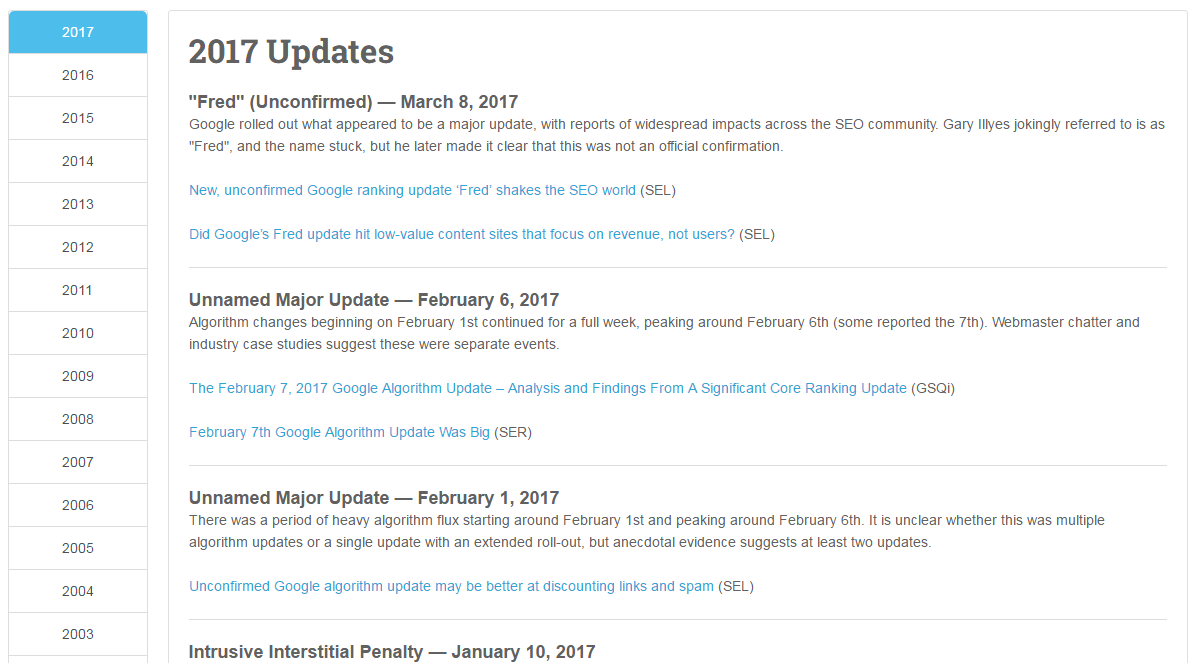
The world of SEO has adapted to the new status quo, with industry blogs fervently hunting for scraps of information divulged at conferences or on social media, and speculating what they might mean for webmasters and marketers.

But does it have to be this way? Should we be taking Google’s obscurity surrounding its updates for granted – or, given the massive influence that Google holds over so many businesses and websites, are we owed a better level of transparency from Google?

A “post-update” world

At last month’s SMX West search marketing conference, the topic of ‘Solving SEO Issues in Google’s Post-Update World’ was a key focus.

But even before SMX West took place, the issue of Google’s lack of transparency around updates had been brought front and centre with Fred, an unnamed and all but unconfirmed ranking update from Google which shook the SEO world in early March.

Fred had an impact on hundreds of websites which saw a sudden, massive drop in their organic search rankings, leaving website owners and SEOs scrambling to identify the cause of the change.

But Google consistently refused to go on record about the algorithm update and what was causing it. It only gained the name ‘Fred’ thanks to a flippant comment made by Google’s Gary Illyes that “From now on every update, unless otherwise stated, shall be called Fred”.

When pressed about Fred during a Google AMA session at SMX West, Illyes replied that the details about what Fred targeted could be found “in the webmaster guidelines”, but declined to give more specifics.

After the Fred update hit, reports surfaced that the algorithm change seemed to be targeting websites with poor link profiles, or those that were ad-heavy with low-value content.

Evidently, the websites affected were engaging in poor SEO practices, and it can be argued that sites who do this shouldn’t be surprised when they are hit with a ranking penalty by Google.

However, if Google wants to clean up the web by rewarding good practices and punishing bad ones – as its actions would suggest – then wouldn’t it be more beneficial to confirm why websites are being penalised, so that their owners can take steps to improve? After all, what’s the point of a punishment if you don’t know what you’re being punished for?

On the other hand, you could argue that if Google specified which practices webmasters were being punished for, this would only help bad actors to avoid getting caught, not provide an incentive to improve.

The pros and cons of Google transparency

In the wake of Google Fred, I asked the Search Engine Watch audience on Twitter whether they thought that Google owed it to its users to be more transparent.

Several people weighed in with strong arguments on both sides. Those who agreed that Google should be more transparent thought that Google owed it to SEOs to let them know how to improve websites.

Additionally, if Google expects website owners to make their sites more user-friendly, then maybe Google should be informing them what it thinks the user wants.

We’ve already seen how this can work in practice, with Google’s mobile-friendly ranking signal giving webmasters an incentive to improve their mobile experience for users.

Others argued that with so many bad actors and black hat SEOs already trying to abuse the system, complete Google transparency would lead to chaos, with people gaming the system left, right and center.

One Twitter user made an interesting point that Google might not necessarily want to help SEOs. At the end of the day, all SEOs are trying to game the system to some extent. Search engine optimization is a game of finding the right combination of factors that will allow a website to rank highly.

Some play by the rules and others cheat, but at the end of the day, there is an element of manipulation to it.

We have a tendency to assume that Google and SEOs – at least of the white hat variety – are on the same side, working to achieve the same goal of surfacing the most relevant, high quality content for users. By that logic, Google should help good SEOs to do their job well by disclosing details of algorithm updates.

But if Google and search specialists aren’t really on the same side, then what obligation does Google have to them?

Is obsessing about updates missing the point?

Maybe all of this debate about algorithm transparency is missing the point. If we agree that website owners should be giving users the best experience possible, then perhaps they should be concentrating on that rather than on the “game” of trying to rank highly in Google.

Michael Bertini, Online Marketing Consultant and Search Strategist at iQuanti and a long-time consultant on all things search, believes that website owners should do exactly that.

“In all my years doing this with both black hat and white hat methods, the best thing anyone could ever do is to do things for the end-user, and not for Google.

“Have you ever Google searched something in the morning and then by noon, it’s dropped a position?  This happens all the time. Granted it mostly happens on page three and above, but every once in a while we do see it on page one.

“What I tell my team and clients is this: if Google makes a change in the algorithm or you notice a drop in your rankings or even in increase in your rankings – don’t take this as permanent.”

Bertini also believes that anyone who is not actively engaging in bad SEO practices should have nothing to fear from a Google algorithm update.

“So long as you’re not keyword stuffing, buying links, building links from private networks,  purchasing social followers or shares, running traffic bots, or any other tactics that could come off as trying to trick Google… you should be fine.

“Those who have to worry about algorithmic updates are usually those who are always looking for a way to manipulate Google and the rankings.”


from SEO – Search Engine Watch http://ift.tt/2prZZsx
via IFTTT

The Homepage is Dead: A Story of Website Personalization

Posted by cara.harshman

In 1998, Jeff Bezos had a vision for the Internet. At that time he was four years into building Amazon. It was taking off as a humongous online emporium of books and music. In an interview with the Washington Post that year, Bezos made a visionary statement about the web. “If we have 4.5 million customers, we shouldn’t have one store. We should have 4.5 million stores,” he said.

Fast-forward 19 years and here we are in 2017. My Amazon homepage is extremely personalized to me. (In August it was showing me glow sticks and solar-powered lamps. It clearly knew I was going to Burning Man.)

Bezos’ vision is reality for Amazon.com and many more e-commerce sites. At this point, personalized product recommendations are table stakes for online retail. But we haven’t seen personalization become as popular across the rest of the non-retail web. Most businesses have one version of the homepage that is supposed to cater to all different sorts of people. The sites still say, “come one, come all!”

This is troubling. Marketers spend so much time and energy developing personas and messaging for the myriad audiences we want to turn into customers. But it usually stops there. It’s time we start extending this persona-driven, personalized marketing to our websites, and specifically the homepage. The homepage is the proverbial front door of our brands; often a landing page, it’s the first page you’ll go to find out who a company is and what it does.

As marketers, it’s our job to crack open the black box on how to do things that may seem like a mystery. SEO? Moz takes care of that one. Website personalization is another one of those mysteries. What are the problems you need to work through to get it done? How much does it cost? How valuable is it?

I want to help bust open that black box by sharing first-hand experience personalizing Optimizely.com. In my time on the marketing team there, we redesigned the homepage. We went from one average best homepage to 26 different versions of the homepage uniquely personalized to different visitors. Let’s talk about why we did it, what we did, and how it all performed (because of course we measured it).

The average best version of our homepage.

Homepage personalized for visitors from Target.

Homepage personalized for visitors from the travel industry.

Homepage personalized for visitors browsing optimizely.com late night.

Homepage personalized for visitors from Microsoft.

Why invest in website personalization?

We redesigned and personalized the homepage for three reasons:

  1. To get closer to a global maximum. We had reached a local maximum on our current site. After four years of iteration and conversion optimization, we had achieved the best possible version of the existing design. New A/B tests on the page returned insignificant results. We had to design a radically different site to get closer to the global maximum with higher conversion rates and engagement. In other words, we were climbing a mountain and had reached a small hill, but our goal was to summit the peak.
  2. To increase lead quality. Our existing homepage was filling the sales funnel with lots of not-so-great leads. Often, people wound up in a conversation with a sales-human who were not sufficiently educated about what Optimizely had to offer. Not a good situation for the lead or the sales-human. We had to redesign the experience so that folks understood our value.
  3. To support account-based marketing (ABM). ABM is an approach to marketing and selling that deliberately aligns sales and marketing around a list of important accounts and delivers targeted campaigns to engage those accounts. The goal is to be highly intentional with who you sell to and nurturing those interactions with personalized content. This personalization campaign was intended to drive engagement with our target accounts.

What to personalize and for whom?

After knowing why we were personalizing, the next question becomes what are we personalizing and for whom? The “for whom” part of this question was our starting place. It’s the best starting point for any personalization campaign. You must define your audience (aka who you’re personalizing for) before you decide on the experience (aka what you’re going to show them).

Defining your audiences takes time and is a worthy investment because it’s the foundation of the campaign. We came up with a few traits for what makes a “good” audience:

  • It should be identifiable. You should have a way to technically identify the thing that makes a visitor part of a specific audience.
  • It should be valuable. Measured either in volume or strategic importance, the audiences should be worth something. Because of our account based marketing approach, some of our audiences consist of one company, but that company has humongous value to us.
  • It should be differentiated enough to receive unique experiences. Your audiences should be distinguished enough to receive a unique experience.

With those traits in mind, you can define audiences across two axes: behavioral/what a visitor does and demographic/who a visitor is.

For our homepage campaign we chose to create unique experiences for these audiences:

  • Named accounts: Current and prospective customers that are part of a target account list. We defined this by uploading a list into Optimizely and using Demandbase to identify the IP address of visitors coming from those companies.
  • Industries: Visitors from target verticals which have strong use cases for A/B testing and personalization. We used Demandbase data for this as well, and CRM data.
  • Geography: Is the visitor from North America or Europe or APAC and so on. For geography we used Optimizely targeting abilities.
  • Customers: Visitors who are known Optimizely customers. We defined customers by identifying visitors who had an Optimizely login cookie on their browser.

2016-02-03 12.08.22.jpgA wireframe drawing of the new site with ample space for personalized content.

  • Engaged visitors: Return visitors who have engaged with one or more of Optimizely’s digital properties in the past (blog, website, community, knowledge base, etc.). We executed this with behavioral targeting through Optimizely.

Once you have audiences defined — and don’t be surprised if this takes a while — you are ready to dissect your page and identify the places you want to personalize.

Sidenote: We had to redesign the homepage in order to make space for content that could be personalized. Take a look at the original site; you can see that there’s hardly anything on the page, no content to personalize! In order to do website personalization, you need ample real estate to create personalized experiences.

How did personalization perform?

This personalization campaign was, importantly, an A/B test: 50% of homepage visitors saw the old version, and 50% saw a personalized one. Personalization is a hypothesis like any other design/functionality change and should be treated with similar rigor as A/B testing. You want to know that the personalization is improving the experience/conversion rate/metrics, not decreasing them.

Here’s the A and B:

In the test we measured lead conversion rate, accounts created, lead qualification rate, and softer anecdotal data like how it helped our sales team in conversations and how our customers reacted to it.

Let’s start with the qualitative data. In short, people loved the new homepage. They even tweeted about it and sent emails to our team. If your homepage design is worth tweeting about, that’s either a fantastic or a horrible sign. We were glad that it was all positive sentiment.

Quantitatively, the new individualized homepage experience performed better than the original.

Overall, we saw a:

  • 1.5% increase in engagement
  • 113% increase in conversions to Solutions page
  • 117% increase in conversions on “Test it Out” CTA to start account creation process

The personalized site did not affect lead conversion rate immediately. Like most online businesses, Optimizely is constantly striving to improve conversion rate (for the right leads, of course). While this new personalized homepage experience is not immediately improving lead quality, the team were confident enough in the results — and in the future optimization opportunity — to move 100% of traffic to the new homepage experiences.

What’s next?

Optimizely successfully killed THE homepage, or rather the single version of the homepage for everyone. They now have a new baseline of personalized homepages to optimize from. Like it goes with A/B testing, one test just leads to another; we always learn something, whether the test wins, loses, or is inconclusive.

The homepage was the tip of the iceberg with personalization. Since launching the homepage, Optimizely has used personalization to add content recommendations on the blog, to run a highly targeted Apple Watch campaign to target accounts (an effective ABM campaign), and to surface relevant product information to potential customers.

The web Jeff Bezos imagined in 1998 has become reality and the opportunities to use personalization to design better web experiences just continue to grow.


Sign up for The Moz Top 10, a semimonthly mailer updating you on the top ten hottest pieces of SEO news, tips, and rad links uncovered by the Moz team. Think of it as your exclusive digest of stuff you don't have time to hunt down but want to read!


from The Moz Blog http://ift.tt/2pCFv10
via IFTTT

Monday, 1 May 2017

8 technical issues holding your content back

Technical SEO has certainly fallen out of fashion somewhat with the rise of content marketing, and rightly so.

Content marketing engages and delivers real value to the users, and can put you on the map, putting your brand in front of far more eyeballs than fixing a canonical tag ever could.

While content is at the heart of everything we do, there is a danger that ignoring a site’s technical set-up and diving straight into content creation will not deliver the required returns. Failure to properly audit and resolve technical concerns can disconnect your content efforts from the benefits it should be bringing to your website.

The following eight issues need to be considered before committing to any major campaign:

1. Not hosting valuable content on the main site

For whatever reason, websites often choose to host their best content off the main website, either in subdomains or separate sites altogether. Normally this is because it is deemed easier from a development perspective. The problem with this? It’s simple.

If content is not in your main site’s directory, Google won’t treat it as part of your main site. Any links acquired on subdomains will not be passed to the main site in the same way as if it was in a directory on the site.

Sistrix posted this great case study on the job site Monster, who recently migrated two subdomains into their main site and saw an uplift of 116% visibility in the UK. The chart speaks for itself:

We recently worked with a client who came to us with a thousand referring domains pointing towards a blog subdomain. This represented one third of their total referring domains. Can you imagine how much time and effort it would take to build one thousand referring domains?

The cost of migrating content back into the main site is miniscule in comparison to earning links from one thousand referring domains, so the business case was simple, and the client saw a sizeable boost from this.

2. Not making use of internal links

The best way to get Google to spider your content and pass equity between sections of the website is through internal links.

I like to look at a website’s link equity as a heat which flows through the site through its internal links. Some pages are linked to more liberally and so are really hot; other pages are pretty cold, only getting heat from other sections of the site. Google will struggle to find and rank these cold pages, which massively limits their effectiveness.

Let’s say you’ve created an awesome bit of functional content around one of the key pain points your customers experience. There’s loads of search volume in Google and your site already has a decent amount of authority so you expect to gain visibility for this immediately, but you publish the content and nothing happens!

You’ve hosted your content in some cold directory miles away from anything that is regularly getting visits and it’s suffering as a result.

This works both ways, of course. Say you have a page with lots of external links pointing to it, but no outbound internal links – this page will be red hot, but it’s hoarding the equity that could be used elsewhere on the site.

Check out this awesome bit of content created about Bears Ears national park:

Ignoring the fact this has broken rule No.1 and is on a subdomain, it’s pretty cool, right?

Except they’ve only got a single link back to the main site, and it is buried in the credits at the bottom of the page. Why couldn’t they have made the logo a link back to the main site?

You’re probably going to have lots of pages on content which are great magnets for links, but what is more than likely is that these are probably not your key commercial pages. You want to ensure relevant links are included between hot pages and key pages.

One final example of this is the failure to break up paginated content with category or tag pages. At Zazzle Media we’ve got a massive blog section which, at the time of writing, has 49 pages of paginated content! Link equity is not going to be passed through 49 paginated pages to historic blog posts.

To get around this we included links to our blog posts from our author pages which are linked to from a page in the main navigation:

This change allows our blog posts to be within three clicks of the homepage, thus getting passed vital link equity.

Another way around this would be with the additional tag or category pages for the blog – just make sure these pages do not cannibalize other sections of the site!

3. Poor crawl efficiency

Crawl efficiency is a massive issue we see all the time, especially with larger sites. Essentially Google only has a limited amount of pages it will crawl on your site at any one time. Once it has exhausted its budget it will move on and return at a later date.

If your website has an unreasonably large amount of URLs then Google may get stuck crawling unimportant areas of your website, while failing to index new content quickly enough.

The most common cause of this is an unreasonably large number of query parameters being crawlable.

You might see the following parameters working on your website:

http://ift.tt/2pnspUJ

http://ift.tt/2p0Za7v

http://ift.tt/2pnpmf6

http://ift.tt/2p13GTi

Functioning parameters are rarely search friendly. Creating hundreds of variations of a single URL for engines to crawl individually is one big crawl budget black hole.

River Island’s faceted navigation creates a unique parameter for every combination of buttons you can click:

This creates thousands of different URLs for each category on the site. While they have implemented canonical tags to specify which pages they want in the index, this does not specify which pages are to be crawled, and much of their crawl budget will be wasted on this.

Google have released their own guidelines on how to properly implement faceted navigation, which is certainly worth a read.

As a rule of thumb though, we recommend blocking these parameters from being crawled, either through marking the links themselves with a nofollow attribute, or using the robots.txt or the parameter tool within Google Search Console.

All priority pages should be linked to elsewhere anyway, not just the faceted navigation. River Island have already done this part:

Another common cause of crawl inefficiency arises from having multiple versions of the website accessible, for example:

https://www.example.com

http://www.example.com

https://example.com

http://example.com

Even if the canonical tag specifies the first URL as our default, this isn’t going to stop search engines from crawling other versions of the site if they are accessible. This is certainly pertinent if other versions of the site have a lot of backlinks.

Keeping all versions of the site accessible can make four versions of a page crawlable, which will kill your crawl budget. Rule redirects should be setup to redirect any request and the non-canonicalization version of the page to 301 redirect to the preferred version in a single step.

One final example of wasted crawl efficiency is broken or redirected internal links. We once had a client query the amount of time it was taking for content in a certain directory to get indexed. From crawling the directory, we realised instantly that every single internal link within the directory was pointing to a version of the page not appended with a trailing slash, and then a redirect was forcing the trailing slash on.

Essentially for every link followed, two pages were requested. While broken and redirected internal links are not a massive priority for most sites, as the resource required to fix them does not outweigh the benefit, it is certainly worth resolving priority issues (such as issues from links within the main navigation, or in our case entire directories of redirecting links) especially if you have a problem with the speed with which your content is being indexed.

Just imagine if your site had all three issues! Infinite functioning parameters on four separate sites, all with double the amount of pages requested!

4. Large amounts of thin content

In the post Google Panda world we live in, this really is a no brainer. If your website has large amounts of thin content pages, then sprucing up one page on your website with 10x better content is not going to be sufficient to hide the deficiencies your website already has.

The Panda algorithm essentially makes a score of your website based upon the amount of unique, valuable content you have. Should the majority of the pages not meet the minimum score required to be deemed valuable, your rankings will plummet.

While everyone wants the next big viral idea on their website, when doing our initial content audit, it’s more important to look at the current content on the site and ask the following questions: Is it valuable? Is is performing? If not, can it be improved to serve a need? Removal of content may be required for pages which cannot be improved.

Content hygiene is more important initially than the “big hero” ideas, which come at a later point within the relationship.

5. Large amounts of content with overlaps in keyword targeting

We still see websites making this mistake in 2017. For example, if our main keyword is blue widgets and is being targeted on a service page, we might want to make a blog post about blue widgets too! Because it’s on our main service offering, let’s put a blurb on our homepage about blue widgets. Oh, and of course, you also have a features of our blue widgets page.

No! Just stop, please! The rule of one keyword per page has been around for nearly as long as SEO, but we still see this mistake being made.

You should have one master hub page which contains all the top line information about the topic your keyword is referencing.

You should only utilize other pages should there be significant search volume around long tail variations of the term, and on these pages target the long tail keyword and the long tail keyword only.

Then link prominently between your main topic page and your long-tail pages.

If you have any additional pages which do not provide any search benefit, such as a features page, then consider consolidating the content onto the hub page, or preventing this page from being indexed with a meta robots noindex attribute.

So, for example, we’ve got our main blue widgets page, and from it we link out to a blog post on the topic of why blue widgets are better than red widgets. Our blue widgets feature page has been removed from the index and the homepage has been de-optimized for the term.

6. Lack of website authority

But content marketing helps attract authority naturally, you say! Yes, this is 100% true, but not all types of content marketing do. At Zazzle Media, we’ve found the best ROI on content creation is the evergreen, functioning content which fulfils search intent.

When we take a new client on board we do a massive keyword research project which identifies every possible long tail search around the client’s products and services. This gives us more than enough content ideas to go about bringing in at the top of the funnel traffic that we can then try to strategically push down the funnel through the creative use of other channels.

The great thing about this tactic is that it requires no promotion. Once it becomes visible in search, it brings in traffic regularly without any additional budget.

One consideration before undergoing this tactic is the amount of authority a website already has. Without a level of authority, it is very difficult to get a web page to rank for anything well, no matter the content.

Links still matter in 2017. While brand relevancy is the new No.1 ranking factor (certainly for highly competitive niches), links are still very much No. 2.

Without an authoritative website, you may have to step back from creating informational content for search intent, and instead focus on more link-bait types of content.

7. Lack of Data

Without data it is impossible to make an informed decision about the success of your campaigns. We use a wealth of data to make informed decisions prior to creating any piece of content, then use a wealth of data to measure our performance against those goals.

Content needs to be consumed and shared, customers retained and engaged.

Keyword tools like Storybase will provide loads of long tail keywords with which to base your content on. Ahrefs content explorer can help validate content ideas by comparing the performance of similar ideas.

I love also using Facebook page insights on custom audiences (by website traffic or email list) to extract vital information about our customer demographic.

Then there is Google Analytics.

Returning visits, pages per session, measure customer retention.

Time on page, exit rate and social shares can measure the success of the content.

Number of new users and bounce rate is a good indication of the engagement of new users.

If you’re not tracking the above metrics you might be pursuing a method which simply does not work. What’s worse, how can you build on your past successes?

8. Slow page load times

This one is a no brainer. Amazon estimated that a single second increase to their page load times would cost them $1.6 billion in sales. Google have published videos, documents and tools to help webmasters address page load issues.

I see poor page load times as a symptom of a much wider problem; that the website in question clearly hasn’t considered the user at all. Why else would they neglect probably the biggest usability factor?

These websites typically tend to be clunky, have little value and what content they do have is hopelessly self-serving.

Striving to resolve page speed issues is a commitment to improving the experience a user has of your website. This kind of mentality is crucial if you want to build an engaged user base.

Some, if not all, of these topics justify their own blog post. The overriding message from this post is about maximising a return of investment for your efforts.

Everyone wants the big bang idea, but most aren’t ready for it yet. Technical SEO should be working hand in hand with content marketing efforts, letting you eke out the maximum ROI your content deserves.


from SEO – Search Engine Watch http://ift.tt/2pP152W
via IFTTT

Google AdWords Testing 8 Ads in Search Results with 4 on Bottom

Google is doing a test right now which ups the number of ads on the search results page from 7 ads up to 8 ads, changing the bottom set of three ads to a set of four instead. This is good news for advertisers who were concerned about the loss of the sidebar ad positions, […]

The post Google AdWords Testing 8 Ads in Search Results with 4 on Bottom appeared first on The SEM Post.


from The SEM Post http://ift.tt/2oXHPLN
http://ift.tt/eA8V8J via IFTTT

Google’s New Jobs Portal Testing in Search Results

  Google is testing out a new jobs portal to make it easier for searchers to find active job listings directly from the search results.  It shows a box, similar to a box style result we have seen added to the search results, but this time it features a job listings interface. Dan Shure spotted […]

The post Google’s New Jobs Portal Testing in Search Results appeared first on The SEM Post.


from The SEM Post http://ift.tt/2pmMvhM
http://ift.tt/eA8V8J via IFTTT

Google Shows “Highly Rated” in Hotel Listings in Search Results

Google has just raised the reviews bar for hotel listings.  Google is testing a new “highly rated” addition to some hotel listings in the search results, which adds the highly rated note along with a thumbs up symbol. Sergey Alakov spotted the highly rated test and shared these screenshots of it. The threshold for earning the […]

The post Google Shows “Highly Rated” in Hotel Listings in Search Results appeared first on The SEM Post.


from The SEM Post http://ift.tt/2pA4gdV
http://ift.tt/eA8V8J via IFTTT

Google Testing New Local Reviews Tab in Knowledge Panel

Google is testing a new format to showcase reviews in the local knowledge panel on mobile.  Instead of the usual format, Google is testing placing the reviews in its own tab instead. Here is what it looks like, courtesy of Sergey Alakov who spotted the test. Sergey Alakov also created an image showing a user […]

The post Google Testing New Local Reviews Tab in Knowledge Panel appeared first on The SEM Post.


from The SEM Post http://ift.tt/2pxn0Je
http://ift.tt/eA8V8J via IFTTT

Social Media Today